Reading a tone's amplitude from a record
A tone's level is stated in g peak, and an averaged autospectrum cannot give it: an ASD is a density, and a tone's spike on it stands as tall as the line spacing and the window make it (Reading a tone off an ASD). The amplitude spectrum is the transform of the record scaled the other way, so that a sine of amplitude \(A\) on a line reads \(A\).
For a frame of \(N\) samples \(x_n\) multiplied by a window \(w_n\),
with the 2 left off at the DC line and the Nyquist line, which have no mirror twin at negative frequency. A sine on line \(k\) transforms to \(A \sum w_n / 2\) there, so dividing by \(\sum w_n\) rather than \(N\) undoes what the window took from it. That is the window's amplitude correction: \(N / \sum w_n\), one over its coherent gain (the window's mean). It is 2.000 for Hann, 4.639 for scipy's flat top and 1 for a rectangle.
It is not the correction a density takes. An ASD is corrected by the
sum of the window's squares, which is what compute_psds uses; the two
differ by the window's noise bandwidth, and the amplitude correction
applied to a Hann density reads every ASD 1.5 times too high.
compute_spectra is a different reading: a rectangular window, no
scaling (a sine on a line reads \(A N / 2\)) and a complex mean across
the averages. The amplitude spectrum is read beside it, not from it.
Which window
A sine that falls between two lines reads low at the taller of them, because that line sits up to half a line off the tone. Harris called the loss scalloping, and it belongs to the window:
| Window | Correction | Noise bandwidth | A sine midway between lines reads |
|---|---|---|---|
boxcar (rectangle) |
×1.000 | 1 line | 3.92 dB low (0.637 of itself) |
hann |
×2.000 | 1.5 lines | 1.42 dB low (0.849) |
flattop |
×4.639 | 3.77 lines | under 0.01 dB low |
Hann is the default, as it is for a density. The flat top's crown is
flat across a line, so a tone reads its amplitude wherever it falls, at
the cost of a main lobe several lines wide: it is the window for an
amplitude that will be compared with a tone table. A flat top's
correction depends on the variant a program implements and how it is
normalized; this one is scipy's flattop, periodic. Every reading
states its window and its correction, so a number is never carried to
another program without them.
Magnitudes, not a complex mean
The frames' magnitudes are averaged. A tone reads its amplitude in every frame whatever its phase there, so the average reads it too: a record saved as captures, each with the tone at a new phase, keeps the tone's amplitude where a complex mean shrinks it toward zero.
What it does to a broadband floor is the other half. Each line of the floor reads its mean magnitude, which goes as one over the root of the frame length and changes with the window: four times as many lines, half the floor. The floor of an amplitude spectrum is not a level. A random record's level is read from its ASD, and its tones from its amplitude spectrum.
A tone that is not well clear of the floor reads high, because the floor's magnitude adds to the tone's in every frame and does not average away. On a 0.89 grms floor from 20 to 2,000 Hz, read at 5 Hz lines under Hann, the floor alone reads about 0.069 g and a 0.05 g peak tone reads about 0.08 g, some 4 dB high. A tone ten times the floor reads within about a percent.
From a script
TimeHistory.amplitude_spectrum reads every channel. The frames are
the record's averaging (its frame length, overlap, start, frame count
and detrend), or each record whole as one frame when it has none; only
the window is the spectrum's own:
history.averaging = Averaging(frame_length=1024, overlap=0.5,
                              window='hann').filled(len(t), 5120.0)
read = history.amplitude_spectrum(window='flattop')
read.correction_text()       # 'flattop window, amplitude correction ×4.639'
read.spacing                 # 5.0 Hz lines
read.frames                  # (119,) frames averaged per channel
frequency, peak = read.tallest(0)
peak / 9.80665               # 2.001, the tone in g peak
print(read.describe(0, 'g', 1 / 9.80665))

visualdynamics.plot.plot_amplitude_spectrum(
    history, 0, window='flattop', path='amplitude.png')
The values are stored in SI, as every record is, so an amplitude comes
back in m/s² for an acceleration. The result, an AmplitudeSpectrum,
carries one row per channel (a record saved as captures is one channel,
its captures' frames pooled), the window and its parameter, the
coherent gain and the correction, the window's noise bandwidth and its
scalloping, the line spacing and the frames averaged. tallest reads
the lines above DC with each frame's mean taken out before its window,
so a record's mean, which leaks through the main lobe into the lines
just above DC (under Hann a 5 g mean reads 5 g on line 1 too), is not
read as a tone, and a real tone on those lines is: 5 Hz at 5 Hz lines
reads 5 Hz under Hann. The drawn curve keeps the mean, at DC and where
it leaks. A tone's own mirror at negative frequency is 2k lines from a
tone on line k, and inside the main lobe the two add, so the flat top,
whose lobe reaches five lines, reads a tone exactly from line 3 up.
lowest_line is that line for the window chosen (1 for Hann), and when
the tallest line falls below it, describe and the pane say that the
window mixes a tone with its mirror there and that Hann reads it. A
channel that is zero throughout, constant throughout, or holds samples
that are not finite, is named as such rather than read. coherent_gain,
amplitude_correction and
scalloping in visualdynamics.core.amplitude_spectrum are the
window's arithmetic on its own.
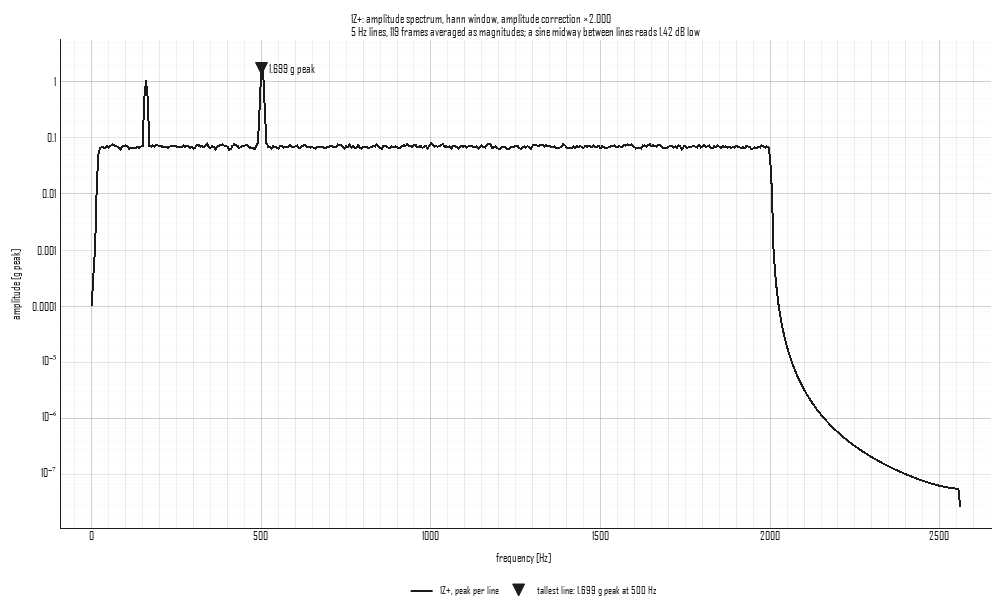
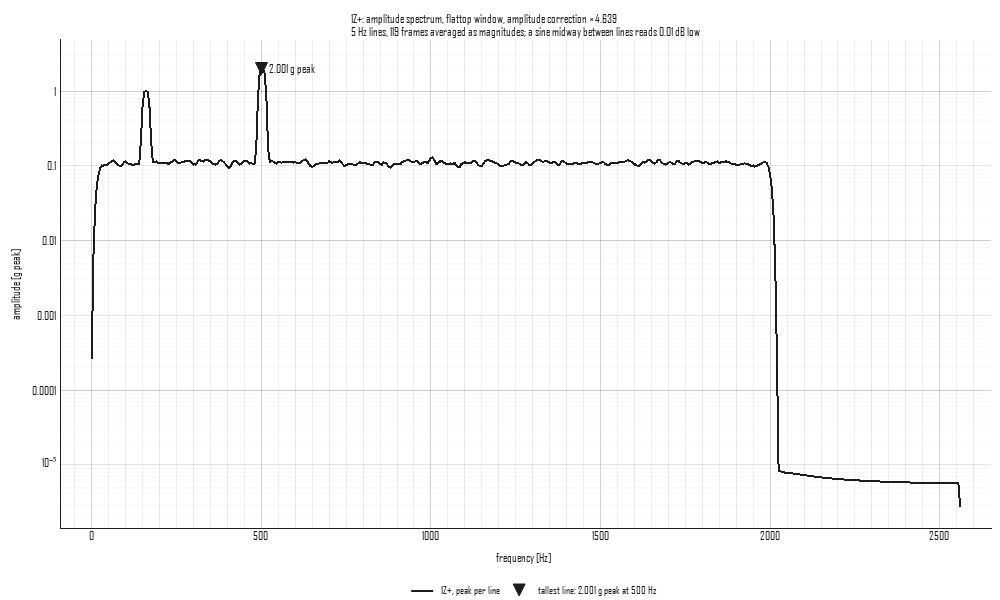
The two figures are 12 seconds of a 0.89 grms floor from 20 to
2,000 Hz with a 1 g peak tone at 160 Hz, on a line, and a 2 g peak tone
at 502.5 Hz, midway between two, read at 5 Hz lines and half overlap
(tools/make_concept_figures.py). Under Hann the tone on a line reads
1.001 g and the one between lines 1.699 g, 1.42 dB low; under the flat
top they read 1.004 and 2.001 g. The floor stands higher under the
flat top, 0.11 g against 0.069 g, because its wider noise bandwidth
passes more of the noise into each line: the floor is not a level.
In the app
Select a time history and press Amplitude on the bar, beside Statistics. One channel is drawn, the first selected; pick another in the tree to read it. The plot's title names the window, its amplitude correction, the line spacing, the frames averaged and how far low the window reads a sine midway between lines, and the tallest line is marked with a triangle and its amplitude in words.
The pane beside the plot sets the window (with its alpha or beta for a
Tukey or Kaiser window) and shows the reading: where the frames came
from (the averaging, or each record whole), the line spacing, the
frames averaged, the coherent gain and the correction, the noise
bandwidth, the loss between lines, and the tallest line in g peak and
g rms. The frames are set in the Averaging reading. The window
chosen is kept as other records are selected. Nothing is made, so there
is no Apply button; the reading is journaled as the
plot_amplitude_spectrum call that draws it.