Writing a sine profile in segments
A sine profile is a short table of segments, each holding one quantity constant between two frequencies. At the low end the quantity is usually displacement, because a constant acceleration costs displacement as one over the frequency squared and the stroke runs out; in the middle it is sometimes velocity; above that it is acceleration. The three are tied together at every frequency by one relation. For a tone of frequency f and peak displacement x,
Where a segment of one quantity meets a segment of another, the two ask for the same amplitude at one frequency, the crossover. For a displacement x below an acceleration a,
which in the hand form, with D in inches peak to peak and a in g, is \(f_c = \sqrt{a / (0.0511\,D)}\). A test document writes the crossovers as breakpoints, and recomputing each one from the levels on either side is the check that catches a level, a unit or a convention typed wrong. A double amplitude read as peak doubles the displacement and moves the crossover; millimeters read as inches move it further. Either way the profile asks the shaker for motion the document did not.
Writing one
SineProfile takes the segments as the document writes them. Each
segment is built in its own unit, and a displacement says which
convention it is in: 'peak' or 'peak to peak' (double amplitude).
The convention is asked for rather than assumed, and a unit of the
wrong quantity (a velocity in inches) is refused where it is typed.
Breakpoints between segments may be written, as the document gives
them, or left out to be solved.
Take a minimum-integrity profile of the kind test documents give for one class of equipment: 5 to 14 Hz at 0.20 in double amplitude, 14 to 33 Hz at 2 g, 33 to 52.1 Hz at 0.036 in double amplitude, and 52.1 to 500 Hz at 5 g.
from visualdynamics.core.sine_profile import (
    SineProfile, acceleration, displacement)
from visualdynamics.plot import plot_sine_profile

profile = SineProfile([
    displacement(0.20, 'in', 'peak to peak', start=5, end=14),
    acceleration(2, 'g', start=14, end=33),
    displacement(0.036, 'in', 'peak to peak', start=33, end=52.1),
    acceleration(5, 'g', start=52.1, end=500)])
for line in profile.describe():
    print(line)
# 5 to 13.99 Hz: 0.2 in peak to peak displacement
# crossover at 13.99 Hz, written 14 Hz: checks
# 13.99 to 32.96 Hz: 2 g acceleration
# crossover at 32.96 Hz, written 33 Hz: checks
# 32.96 to 52.12 Hz: 0.036 in peak to peak displacement
# crossover at 52.12 Hz, written 52.1 Hz: checks
# 52.12 to 500 Hz: 5 g acceleration
# every crossover checks
profile.maxima()['velocity']        # (13.99, 0.223): 8.8 in/s at 14 Hz

plot_sine_profile(profile, path='sine-profile.png')
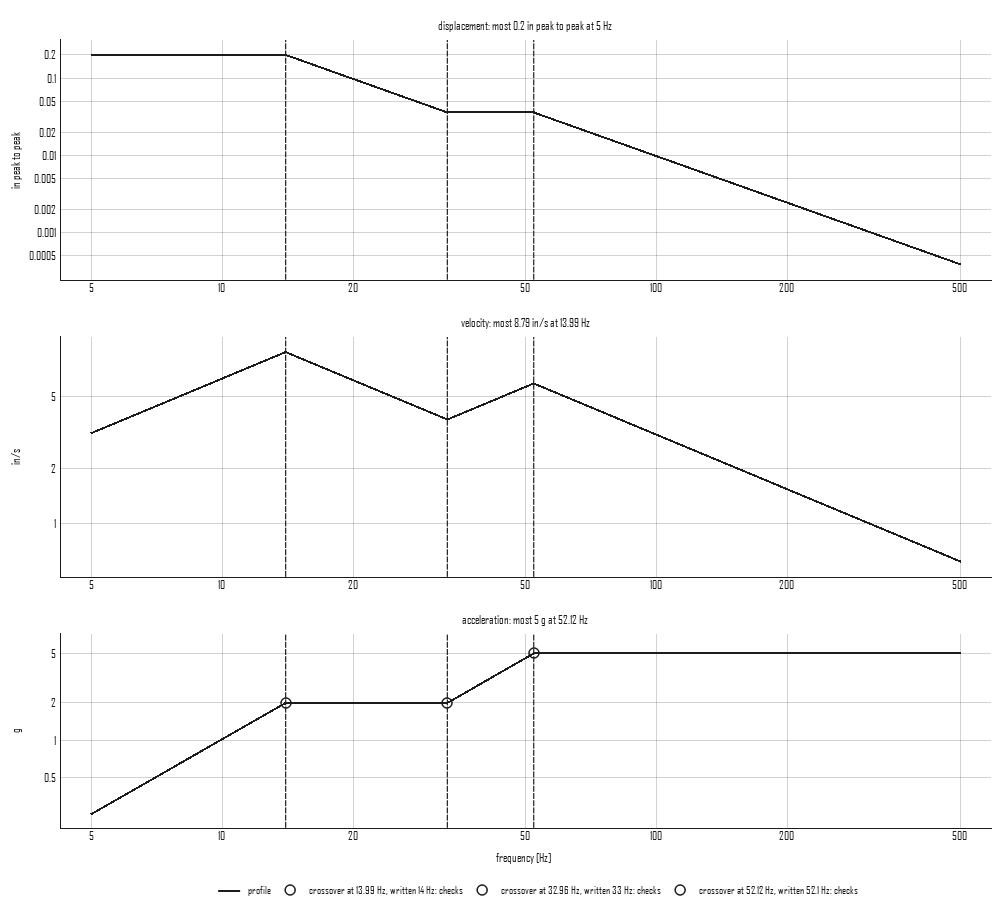
A written breakpoint checks when it is within CROSSOVER_TOLERANCE
(1 %) of the crossover the levels solve to, room for a document that
rounds to three figures; tolerance= sets another. The middle
displacement is worth the second look the three rows give it: it is
flat on the displacement row and a ramp of 12 dB per octave on the
acceleration row, so between 33 and 52.1 Hz the profile climbs from
2 g to 5 g.
Type the first displacement as peak instead and the check says so:
wrong = SineProfile([
    displacement(0.20, 'in', 'peak', start=5, end=14), *profile.segments[1:]])
wrong.crossings[0].describe()
# 'crossover at 9.889 Hz, written 14 Hz (+41.6 %): does not check,
#  a step of 0.499 there'
The step is what a controller that takes the breakpoints as typed would show at 14 Hz, from 4 g down to 2 g; a controller that solves its own crossovers would draw a smooth curve through 9.9 Hz instead, and nothing on its screen would look wrong. On the plot, the solved crossover is dashed and the breakpoint the document wrote is dotted beside it, so the error reads as the gap between them. Read as inches, the 0.91 mm form of the middle displacement does not meet its neighbors inside the band at all, and the profile is refused with the segment named. Two segments of one quantity meet in a step rather than a crossover; the boundary must be written, and the step is reported.
What the controller runs
profile.tone(name, rate) writes the profile as the tone a controller
runs: acceleration breakpoints swept at one rate, law='log' in
oct/min (the default) or law='linear' in Hz/s, up or with
descending=True down. profile.specification(dofs, rate) wraps that
tone in a SineSweepSpecification asked of every control channel, in
m/s². A tone interpolates its level linearly in sweep time between
breakpoints, which follows a constant acceleration exactly but not a
constant displacement or velocity, so such a segment is written as
enough breakpoints that the interpolated level stays within
ACCURACY (1 %) of the profile; accuracy= sets another. The tone is
built on the solved crossovers, so it is continuous, and a profile that
does not check, or that steps, is refused there: a sweep cannot jump.
Reading a tone back as a profile
read_profile(specification) goes the other way, for a tone already
written as breakpoints (a controller's file, or a specification made
here). Each stretch between breakpoints is classified by the slope of
its acceleration on log axes: 12.04 dB per octave holds the
displacement constant, 6.02 the velocity, and a flat stretch the
acceleration, each within SLOPE_TOLERANCE (0.3 dB per octave, room for
levels rounded to two figures). A breakpoint typed at the wrong
frequency or level bends the stretches beside it off all three, so a
stretch that holds none of them is refused by name with its slope,
such as 'from 33 to 60 Hz the level rises at 9.2 dB per octave'.
interpolated(specification) gives the tone's own level as it runs it;
beside the profile read from it, it shows where breakpoints are too far
apart for the segment they write. Five breakpoints written straight from
the document above (0.26, 2, 2, 5 and 5 g at 5, 14, 33, 52.1 and
500 Hz) interpolate to 0.33 in peak to peak at 7 Hz, 65 % more than the
0.2 in the segment holds.
In the window, select a sine specification and turn on Sine
Profile on the bar, beside Sweep Rate (the two readings of a
specification take turns). The tone is drawn three ways with its
crossovers marked, and its own interpolated level dashed over it. The
panel beside the plot holds the slope tolerance and whether the tone's
own level is drawn, and reads back the segments, the crossovers and how
many check, and the most the profile asks for in displacement, velocity
and acceleration, then a line per segment and crossover. A tone that
is not written in the three quantities is refused there by name, and
its own level is still drawn. Each edit is journaled as the
plot_sine_profile call that draws it.
Where judgment lives
- The most displacement, velocity and acceleration (
maxima) are what go against the shaker's stroke, velocity and force ratings, with the real moving mass and the body's motion on its mounts counted. The profile's peak velocity sits at a crossover, where a displacement gives way to an acceleration. - A breakpoint within the tolerance checks, and the tone is built on the solved crossover rather than the rounded figure. A breakpoint outside it is a level or a convention to send back to the document's owner before anything is typed into a controller.
- A profile read from a controller's breakpoints checks itself only as far as its slopes do: a level typed wrong at every breakpoint of a segment, the same way, keeps its slopes and reads as a smaller or larger profile. The maxima are the check on that, against the document's own numbers.