Writing a random specification by slope
A random specification arrives as a breakpoint table. Some tables give a level at every breakpoint. Many give a level, a slope in decibels per octave and the next frequency, and leave the level there to the reader. This page describes how such a table is entered in Visual Dynamics, how its levels are computed, and how the specification is read segment by segment: each segment's area, and the rms accumulated from the low end.
A slope is a power law
Between two breakpoints a specification is a straight line on log-log axes, a power law W = C fn. A decibel on a density is ten times the logarithm of a ratio, so a slope of N dB per octave is an exponent
n = N / (10 log10 2) = N / 3.0103
and the level it reaches at f2 from W1 at
f1 is W1 (f2 / f1)n.
Plus 3 dB per octave is an exponent of 0.9966, minus 6 is −1.993. Test
documents write 3 where they mean 3.01; over two octaves the difference
in a level is under half a percent, too small to see in the rms.
core.breakpoints.OCTAVE_DB is the exact 3.0103, for a slope meant as
an exponent of exactly one.
Each segment's area, and the running rms
The rms is the square root of the area under the specification, and a
breakpoint table makes the area a sum of segments, each with a closed
form. For a segment from (f1, W1) to
(f2, W2) with exponent n, the area is
W1 f1 ((f2/f1)n+1 − 1) / (n + 1),
and at n = −1 (minus 3.0103 dB per octave, minus 10 dB per decade),
where that divides by zero, it is
W1 f1 ln(f2/f1). Both
are core.compliance.log_log_areas, the integral the rms of a
specification written at breakpoints is computed by, so its segment
areas add up to the rms the specification's table under its plot shows.
A controller's target on its lines is a density per line, integrated
as bins, and is not a breakpoint table: read as a power law between its
lines it would give an rms the object does not have (6.784 g where the
bins hold 6.799 g, for the profile below put on 20 Hz lines). The view
refuses it; open it as a sheet and read its breakpoints
(SpecificationDraft.to_breakpoints).
The areas say where the rms comes from, which the plot does not. On log axes a slope at the top of the band looks like a short line at the end of the profile, and it is often the largest area of all, because a hertz at 1,500 Hz counts as much as a hertz at 100 Hz. The running rms, the root of the area from the lowest breakpoint up to each frequency, shows the same thing as a curve: it climbs steeply where the area is.
A worked example: 0.01 g²/Hz at 20 Hz, plus 3 dB per octave to 80 Hz, flat at 0.04 g²/Hz to 500 Hz, minus 3 dB per octave to 2,000 Hz. The segments are 1.50, 16.8 and 27.7 g², 46.0 g² in all, and the rms is 6.78 g. The falling segment is 60 percent of the area, and the running rms reads 1.22 g at 80 Hz, 4.28 g at 500 Hz and 6.78 g at 2,000 Hz.
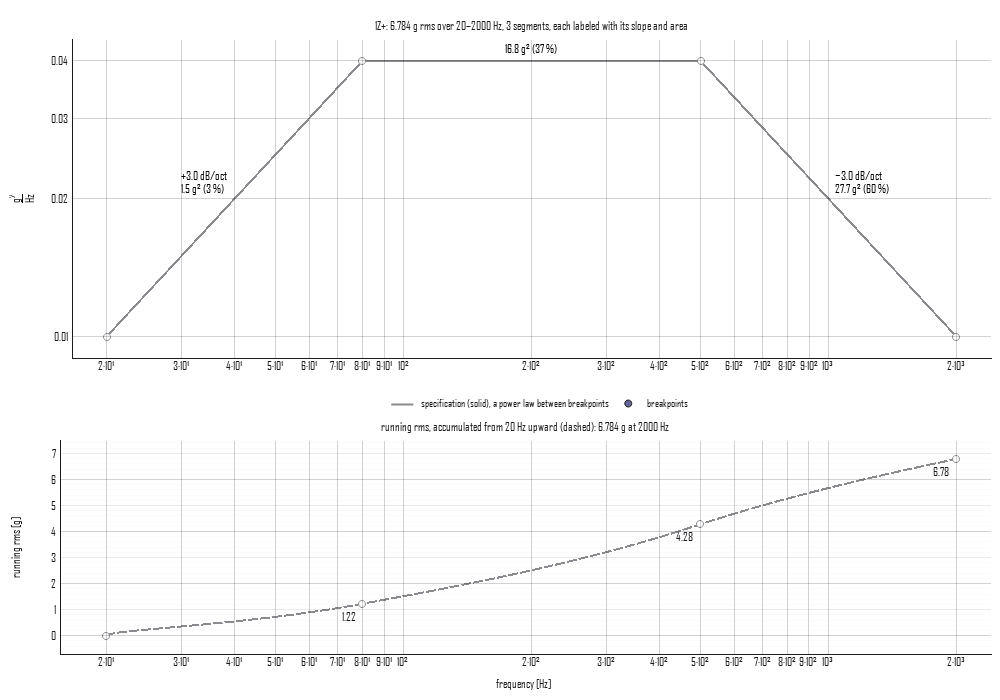
Averaging a sloped segment's two end levels and multiplying by its width, the trapezoid, is right only at an exponent of one. On the falling segment above it gives 37.5 g² instead of 27.7, and a hand check that disagrees with these numbers usually holds that error.
In the specification sheet
The sheet beside the plot (see The objects) has an Enter: row with two buttons. Levels is a level at every breakpoint, as before. Slopes adds a dB/oct column beside each channel's level: the first breakpoint takes a level, and each one after it a slope from the breakpoint above, with the level the slope reaches shown beside it. Under Slopes an edit holds every slope it does not change:
- A slope typed sets the level at its breakpoint, and the levels after it move with it, each segment after keeping its slope.
- A level typed changes the slope into its breakpoint, and the slopes after it are held; typed at the first breakpoint, the whole table moves with it.
- A frequency moved within its neighbors keeps every slope. Moved past a neighbor, the segments themselves change, and the levels go with their rows as they do under Levels.
- Scale selected scales the selected levels as they stand; slope cells in the selection are passed over.
The two entries are one requirement: switching between them writes nothing to the specification, and the specification made is the same. Slopes is offered on the breakpoints form only; the interpolated form is a controller's reading of the breakpoints, and is edited by level.
Areas and running rms, also on the breakpoints form only, writes each segment's slope, area and share of the whole on the plot, draws the running rms dashed in a row under it on the same frequency axis, and reads the table out under the breakpoints for the channel on the plot: each segment's slope, area, share and the rms to its end, then the total.
From a script
from visualdynamics.core.author import SpecificationDraft
from visualdynamics.core.breakpoints import OCTAVE_DB
from visualdynamics.plot import plot_breakpoints

g2 = 9.80665 ** 2                                   # levels are stored in SI
draft = SpecificationDraft(['1Z+'], ['acceleration'], [20.0, 80.0],
                           [[0.01 * g2, 0.04 * g2]], entry='slopes')
draft = draft.with_slope_breakpoint(500.0, 0.0)     # flat to 500 Hz
draft = draft.with_slope_breakpoint(2000.0, -OCTAVE_DB)  # -3 dB/oct to 2 kHz
reading = draft.reading('1Z+')
print(reading.areas / g2)                           # 1.50, 16.8, 27.7 g^2
print(reading.running / 9.80665)                    # 1.22, 4.28, 6.78 g
plot_breakpoints(draft, path='breakpoints.png')
spec = draft.make(comment='by slope')               # the specification
with_slope(segment, db_per_octave) types a slope into an existing
segment, and with_level(breakpoint, level) types a level, holding
the slopes after it when the draft's entry is 'slopes'. The pure
functions are in core.breakpoints: level_at_slope,
levels_from_slopes, segment_slopes, segment_areas, running_rms
and read_breakpoints, each taking levels in any unit of density.