A report plot's caption
A spectrum in a report is evidence only when a reader who was not at the test can say what it is: which channel, at which location and in which axis; which run, and which stretch of it; how the spectrum was estimated; the line spacing; the window and overlap of its frames; the degrees of freedom of its average; and the requirement drawn on it. Those lines are the same on every plot of a kind, and every one of them is already held by the record or the objects around it. Visual Dynamics reads them into a caption block, so none of them is typed and none goes stale when the analysis is redone.
The line spacing and the degrees of freedom are not formalities. A resonance's peak height in an autospectrum depends on the spacing, and how far a line may sit from the reference by chance depends on the degrees of freedom (What an average is worth). Without them, two plots cannot be compared and an excursion cannot be judged.
What the block says
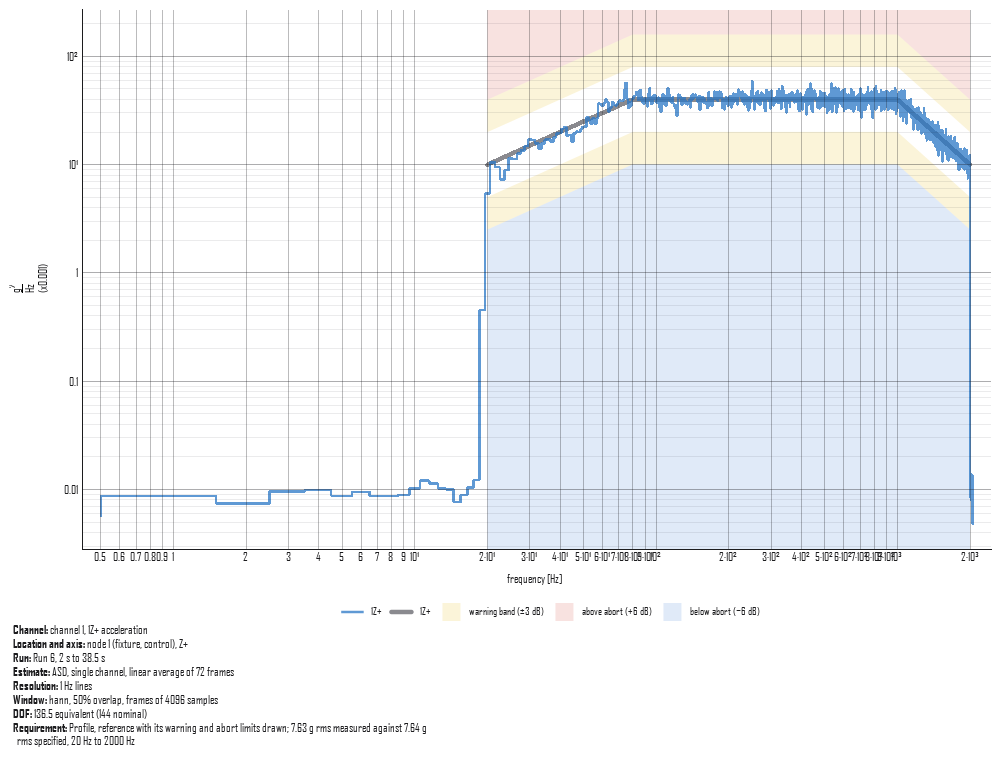
The block has eight rows, always in this order:
| Row | Read from |
|---|---|
| Channel | The record's DOF and quantity, with the channel number from the channel table row of that DOF and quantity; a cross term names its reference channel after it |
| Location and axis | The node and direction in the DOF, the channel table's comment, and the global axis the direction is nearest on the geometry |
| Run | The time history the spectrum was computed from, and the stretch of it averaged, in seconds on its clock |
| Estimate | ASD or CPSD, one channel or several, a linear average of how many frames, how many records each channel pooled when any pooled more than one, and the bands for a banded spectrum |
| Resolution | The line spacing, or the bands and the lines they were banded from |
| Window | The averaging's own description (Averaging.describe): the window and its parameter, the overlap, the frame length, and the detrend when there is one |
| DOF | The equivalent degrees of freedom, discounted for overlap, beside the nominal count; for a banded spectrum, the bands' counts beside a narrowband line's |
| Requirement | The specification drawn, which of its limits are drawn, and the overall rms measured (and as drawn, where the comparison scales it) beside the rms it specifies, over the band the comparison judged; or why the record was not compared |
A fact nothing records is written as "not recorded" rather than left out, so a reader sees the gap instead of assuming the row was never needed. A spectrum imported from a file carries no averaging and no run the project knows of, so its run, window, frames and degrees of freedom read "not recorded": the name an import gave the object is not a run. A band sums lines, and carries their degrees of freedom: a banded spectrum's caption gives the range of its bands' counts, each worked from the narrowband lines the band sums the way the Chance reading combines lines (Combining lines), beside the count of one narrowband line. Without the narrowband spectrum and its averaging the bands' count cannot be worked out, and the caption gives the line's count before banding and says so.
The rms values in the Requirement row are the comparison's own (the ones the verdict table states), over the band it judged. Where the comparison scales the measurement to the specification, the row gives the measured rms both as measured, the number a reader holding the raw data would compute, and as drawn and judged; the scale itself is in the figure's legend and caption. A record the comparison cannot judge gets no rms, and the row says why after "not compared": a record of another quantity than the specification (an acceleration requirement against a velocity record), a record with no finite line, or a specification with no record for the channel. A cross term between a drive point's force and its acceleration names one DOF twice and is a CPSD.
Where the channels of one figure pooled different numbers of records
(two captures of one channel and one of another), the Estimate row
says how many each pooled, since that sets each channel's degrees of
freedom. The overlap is written the same way in a caption, a label and
a {{Object.overlap}} reference: two-thirds overlap is 66.7% in all
three.
A shock response spectrum's caption
A shock response spectrum is read at a Q, on natural frequencies spaced so many to an octave, as one kind of peak, from a record that may have been filtered on its way there, and it is accepted on how many of its points lie inside a band. Each of those changes what the curve means, so its caption block has nine rows:
| Row | Read from |
|---|---|
| Channel, Location and axis | As for a spectrum, one entry per channel drawn |
| Run | The time history the spectrum was computed from, and the events drawn by their labels |
| Q | The spectrum's amplification, with the damping it stands for |
| Spacing | Natural-frequency lines per octave, read off the spectrum's own frequencies, and the first and last of them |
| Type | Which peak each point is: maximax, positive or negative |
| Filter | Each filter applied in the project on the way to the run, with its order and its zero-phase pass, or none |
| Sample rate | The run's |
| Points rule | Against the requirement drawn: the band and the rule (Judging an SRS against its tolerance), then each record drawn, in each polarity the project holds, with the count of its points inside the inner band and inside the outer, and whether it passes |
The polarities are the spectrum drawn and each other spectrum the project holds of the same events at the same Q and spacing: compute a positive and a negative spectrum beside the maximax one and each caption judges all three. A record with no point to judge says why (a record of zeros, a record of points that are not numbers, a spectrum outside the requirement's band) and never passes; a point that is not a number is left out of the count and the row says how many were. Whether a spectrum is of the primary or the residual response is not held by the spectrum, so the caption does not say.
A sine level's caption
A sine level is read off a recording by tracking each tone, so its caption block names the sweep, the detector and the distortion beside the level:
| Row | Read from |
|---|---|
| Channel, Location and axis | As for a spectrum, one entry per control channel drawn |
| Run | The recording the level was extracted from, the tone, and where in the recording its sweep was found |
| Sweep | Each segment of the tone as the requirement specifies it: linear in Hz/s or logarithmic in oct/min, ascending or descending, from and to; a dwell's frequency and duration; and the correction the extraction made to the sweep's clock, where it made one |
| Detector | The Vold-Kalman filter the extraction tracks each tone with, and the smoothing the levels were read with, in cycles of the tone's frequency |
| Distortion | The distortion check of the tone on each channel (Checking a sine record for distortion), its worst line and how many lines were over the limit |
The distortion check rebuilds every tone on every channel, so a caption does not make it: it states the check the report's Check blocks made of that tone over the same recording, and says "not checked" when the report makes none. Which sweep of a run's several a level was is not held by the level, so the caption does not say.
A time history's caption
| Row | Read from |
|---|---|
| Channel, Location and axis | As for a spectrum, one entry per channel drawn |
| Run | The time history, the span recorded and, where an averaging is set, the stretch analyzed |
| Sample rate | The record's |
| Range | Each channel's full scale from the channel table, in its own units (the level it clips at), or why the table gives none |
From a script
Project.caption_of reads the caption for one record, or for the
records a plot draws, from the project: the averaging from the
spectrum's provenance, the run it came from, and the channel table and
geometry linked with them. It reads a shock response spectrum's, a
sine level's (name the tone of a set with tone) and a time history's
the same way.
import visualdynamics

project = visualdynamics.random_vibration_run('run.nc4')
caption = project.caption_of('Time History PSDs', 0,
                             specification='Specification')
for label, said in caption.rows():
    print(f'{label}: {said}')
print(caption.text())          # the same, as one paragraph

visualdynamics.plot.plot_captioned(
    project['Time History PSDs'], 0, caption=caption,
    specification=project['Specification'], path='control_1.png')
plot_captioned draws the record against the specification as the
comparison view draws it, and puts the caption block under the plot,
a row a line with each label in bold, so a picture pasted into another
document keeps the lines that let it be checked. Without a caption
it reads one off the record alone, where the window and the run are
not known. core.report_caption.record_caption is the function under
both, for a spectrum and its averaging held outside a project.
In a report
A plot block of a measured spectrum, a shock response spectrum, a sine
level or a time history draws the caption block under its figure when
the block sets 'record_caption': True, or when Caption from the
record is checked in the editor's pane for that block. The built-in
templates set it on every figure of a measured spectrum, a shock
response spectrum and a sine level they write, so a report generated
from one carries the blocks from the start; uncheck the box to take a
figure's away. The
pane reads the caption out beneath the check, as the page will show
it. A figure drawn a channel at a time carries each channel's block,
and the page shows the one picked. A grid of control channels says
once, under the grid, what its cells share (the run, the estimate, the
resolution, the window and the DOF), and each cell gives only its own
channel's rows (for a sine level, the run, the sweep and the
detector). The block's own caption stays the figure's title, and
figure references still find the figure by it.