Composing a figure from a script
Every reading in Visual Dynamics has a plot of its own, and selecting
several objects draws them together. A figure for a report or a page
sometimes needs more: two runs on one axis with the second dashed, a
mode marked and named on the curve, a record's time history beside its
spectrum, several panels held to one scale so they can be compared.
Five calls in visualdynamics.plot compose such a figure out of the
same drawing the application uses, so it carries the app's axes, units,
legends and theme, and is written to a file with no window.
The five calls
compose(build, path=..., theme=..., size=...)is the frame.build(layout)draws into a pyqtgraph layout; the figure is laid out off screen atsize(logical pixels) and written topath, or shown in the application's data pane whenpathis omitted. It is the path every standalone plot in the package takes.frequency_axis='log'(or'linear') holds for the figure and is put back afterwards.as_series(items)turns data arrays into the list the builders take. An item is a data array,(name, data), or(name, data, records); names prefix the legend entries when more than one object is named.figure_plots(layout, dimension=None)lists the plots in a figure, row by row and left to right within a row (a nested panel's plots where the panel sits), or only those drawing one quantity:figure_plots(layout, 'length')is the displacement plot of a stack, wherever it landed.to_view(plot, x=..., y=...)converts values in display units to the coordinates the plot's view holds. On a log axis the view works in decades, so a line, a label or a marker placed without the conversion lands at the logarithm of where it was meant to go. A curve added withplot.plotneeds no conversion; pyqtgraph converts it.pin_range(plot, x=(low, high), y=(low, high))fixes the range a plot opens at, in display units. A plot drawn bybuild_plotslimits zoom and pan to its own data, and a range set straight on the plot is clamped back inside that frame;pin_rangemakes the pinned range the plot's limit instead.
Panels side by side are nested layouts: layout.addLayout(row=0,
col=1) makes a panel, and build_plots draws into it as into a whole
figure, with its own stack and legends.
An example
import pyqtgraph as pg
from PySide6.QtCore import Qt

from visualdynamics.plot import (as_series, build_plots, compose,
                                 data_curves, figure_plots, pin_range,
                                 to_view)

def build(layout):
    left = layout.addLayout(row=0, col=0)
    right = layout.addLayout(row=0, col=1)
    build_plots(left, as_series([record]), theme='light')
    build_plots(right, as_series([('before', before), ('after', after)]),
                theme='light')

    asd = figure_plots(right, 'acceleration**2/frequency')[0]
    pin_range(asd, x=(20.0, 2000.0), y=(1e-4, 1.0))

    # the second run is told apart by its line, not only its color
    _, dashed = data_curves(asd)
    pen = pg.mkPen(dashed.opts['pen'])
    pen.setStyle(Qt.PenStyle.DashLine)
    dashed.setPen(pen)

    # a mark and a label, placed in hertz and g²/Hz
    x, y = to_view(asd, x=180.0, y=0.5)
    asd.addItem(pg.InfiniteLine(pos=x, angle=90,
                                pen=pg.mkPen('#555555',
                                             style=Qt.PenStyle.DotLine)))
    label = pg.TextItem('first mode before, 180 Hz', color='#222222',
                        anchor=(0, 1))
    label.setPos(x, y)
    asd.addItem(label)

compose(build, path='before-after.png', theme='light', size=(1000, 460),
        frequency_axis='log')
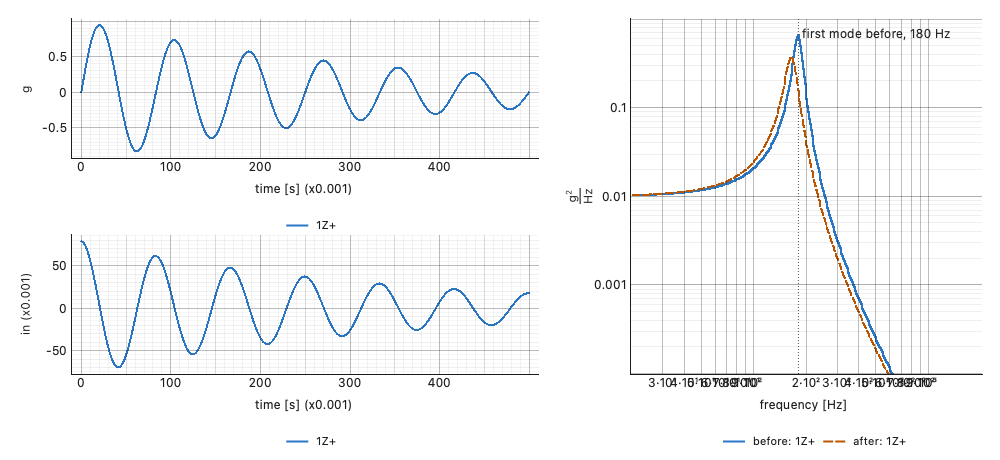
record holds an acceleration and a displacement, so build_plots
stacks them on two plots in the left panel. before and after are
ASDs of one channel, drawn on the one plot in the right panel.
The theme
theme on compose sets the frame: the ground under the plots and
the default colors of anything drawn by hand with pyqtgraph. The
builders are told the theme themselves, as build_plots(...,
theme='light') above, which is how the application calls them too.
Give both the same theme. A builder told nothing draws in the default
theme, light.
What is refused
Each call refuses what cannot be drawn and says why, before anything is drawn where it can:
compose: abuildthat is not a function; a size that is not two positive numbers; a file extension that names no image type (.svg,.png,.jpgand the other types Qt writes are accepted,.pdfis not); afrequency_axisthat is not a setting, or one given withoutpath, since a shown pane may redraw after the setting is put back.as_series: nothing to draw; an item that is not a data array, or a tuple that is not two or three long; a name that is not a string; records that are empty, are not indices, or are not in the array (a negative index included, which would otherwise count from the end).figure_plots: a dimension the units do not track ('displacment'), and a quantity no plot in the figure draws; the message lists the quantities it does draw.to_viewandpin_range: a value that is not finite, a zero or negative value on a log axis, and a range whose low end is not below its high end.
plot_series reads its items through as_series, so it refuses the
same items.
Writing for print
A composed figure is written the way every standalone plot is: a
.png at one pixel per logical pixel, or at visualdynamics.plot.
EXPORT_DPI when that is set. Lay the figure out at its printed size
(inches times 96) and set the resolution, as
Figures for print describes.