Report features
A report feature is an optional addition to a generated report. Each one is off until it is turned on, and a report with none turned on is exactly the report Visual Dynamics writes otherwise, byte for byte.
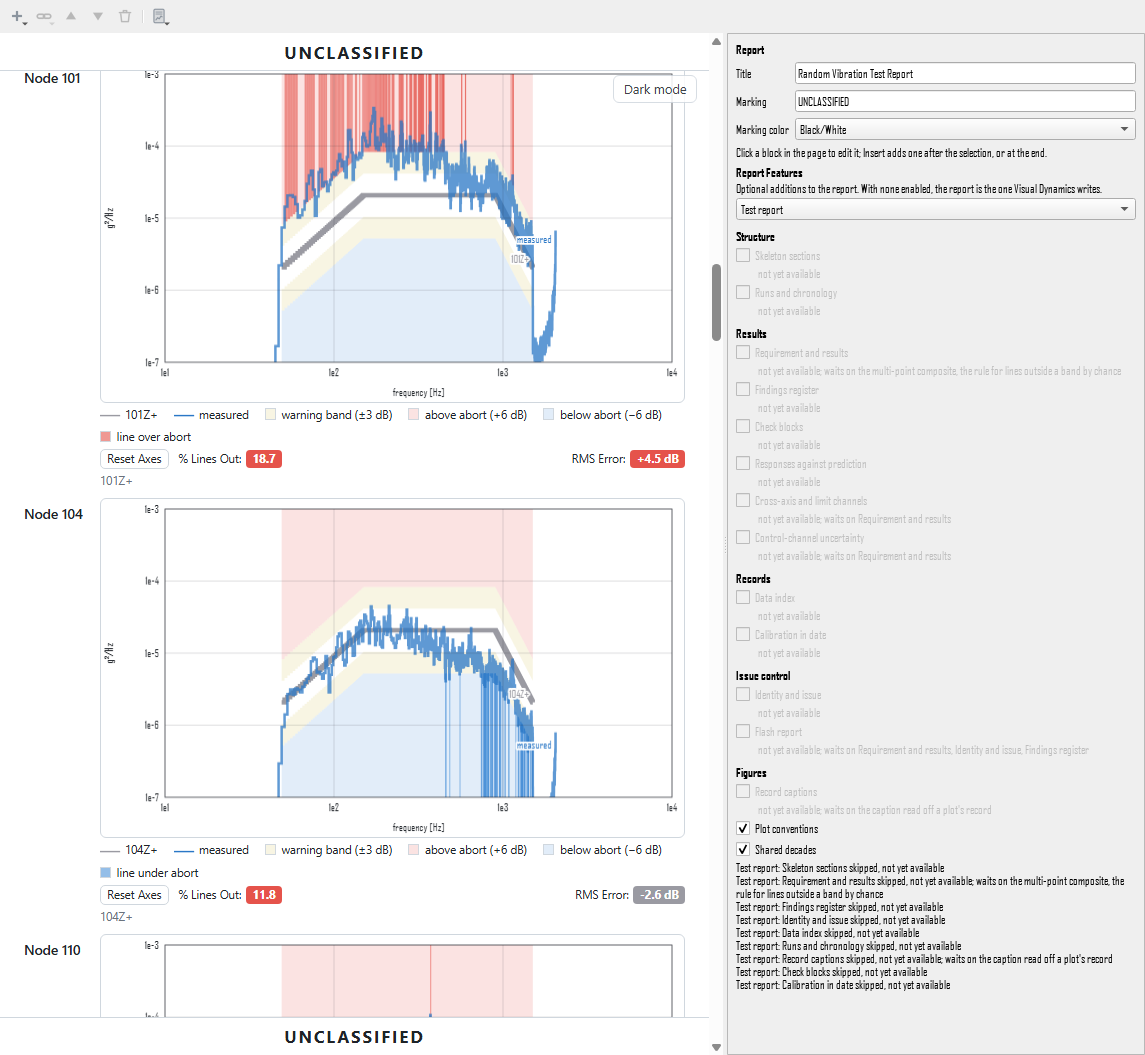
Choosing features
With no block selected, the report editor's pane holds the report's title and marking and, under them, the Report Features panel. Each feature has a check box, grouped by what it adds to the report: Structure, Results, Records, Issue control and Figures. Its tooltip says what it does. A feature that cannot be turned on is grayed out, with the reason beneath it: not yet available, or the feature it needs (Shared decades needs Plot conventions). Turning a feature off also turns off any feature that needs it, and the panel says so.
From a script, the same choice is one call:
project.report_features('Report', enable=['plot_conventions'])
project.report_features('Report', disable=['shared_decades'])
project.report_features('Report', preset='test_report')
The call returns what is enabled afterwards and any notes, and is
recorded in the journal as that line. It refuses, changing nothing, an
unknown feature or preset, a feature that is not available yet, and a
feature whose requirement is not met; a feature can be enabled in the
same call as the one it needs. The choice is saved with the report in
the project file, and in a .vdreport template, so a house template
carries its choice of features from one test to the next. A report
saved before features existed opens with none.
Presets
The drop-down at the top of the panel sets a starting point.
| Preset | Features | For |
|---|---|---|
| Visual Dynamics default | none | quick looks, and every existing report |
| Test report | skeleton sections, requirement and results, findings, identity and issue, data index, runs and chronology, record captions, plot conventions, shared decades, check blocks, calibration in date | a report a quality signer and a customer will read |
| Flash report | identity and issue, requirement and results, skeleton sections, findings, flash report | the one preliminary page a customer leaves the test with |
A preset may name a feature that is not built yet. Choosing it turns on the ones that are available and lists, under the panel, each one it skipped and why. A set that matches no preset shows as Custom.
Skeleton sections
Skeleton sections (group Structure) lays the report out on the sections a test report needs, in the order its readers look for them, and closes it with the line "End of report.", so a reader holding the pages knows whether all of them are there.
| Section | What belongs in it | Filled by |
|---|---|---|
| 1. Identification | title, number and revision, the laboratory, the customer, the dates, who authorized it | the author, or the identification block with Identity and issue on |
| 2. Summary | what was tested and why, the result against each requirement, the deviations by number, the open anomalies | the author, above the pass/fail box and the generated description |
| 3. Requirement | the governing document, the plan and procedure, the tolerance clause, the completion criteria | the author, with the requirement in words under it when Requirement and results is on |
| 4. Test Article | description, part and serial, configuration, condition | the author |
| 5. Setup and Method | facility, fixture, control strategy, settings, equipment and calibration | the author |
| 6. Instrumentation | the channel table and any sensor averaging | the geometry, DOF scenes, photographs and channel table |
| 7. Chronology | the runs in order, interruptions and failures, from the log | the author |
| 8. Results | the control against the tolerance and every other result | every other generated figure and its text, opened by the result table when Requirement and results is on |
| 9. Deviations, Anomalies and Nonconformances | each one in full, or None | the author |
| 10. Discussion and Interpretation | what the results mean, and by whom, or None | the author |
| 11. Conclusion | the statement of conformity and the rule it was decided by | the author, with the generated reading guide under it |
| 12. Record and Data Package | what is attached, referenced and kept | the author, with the data index under it when Data index is on |
A generated report's own sections fall under the skeleton by what they hold: a section with the pass/fail box, or one of text only before the first figure, goes under the Summary; a section with the geometry, a DOF scene, a photograph or the channel table goes under Instrumentation; one of text only after the last figure goes under the Conclusion; everything else goes under Results. Their headings sit one level below the skeleton's. The report's blocks themselves are not moved: the layout is made when the page is drawn, and turning the feature off gives back the page as it was.
Owed sections
A section only the author can write shows, until it says something, as a framed card reading NOT YET WRITTEN with what belongs there. Instrumentation and Results are owed only when nothing falls under them. The program never writes an author's words for them: the article, the method, the chronology, the findings, the discussion and the conclusion stay the engineer's. What it adds is fixed text: the conclusion always ends "The results relate only to the item tested.", and the discussion is labeled with who made the interpretation, or not stated until someone is named.
In the editor, click a section's heading to write it. The pane shows what belongs in the section above the Markdown editor; for Deviations, Anomalies and Nonconformances and for Discussion and Interpretation a None button writes "No deviations. No anomalies. No nonconformances." or "No interpretation is offered beyond the results." in one step, and the discussion has an Interpretation, by field. A section's text can hold pipe tables:
Before export
Export first lists every section still owed (not yet written, nothing in it, or a discussion that does not say by whom) and asks whether to export anyway. A script asks the same question:
project.report_features('Report', enable=['skeleton_sections'])
project.report_section('Report', 'article', 'Bracket, part 1234, serial 7.')
project.report_section('Report', 'deviations', none=True)
project.report_section('Report', 'discussion', 'The notch is the fixture.',
                       by='J. Doe')
project.report_check('Report')
# ['1. Identification: not yet written', '2. Summary: not yet written', ...]
report_section refuses an unknown section, None for a section that
always has something to say, and an attribution outside the
discussion. report_check refuses a report without the skeleton,
since there is then nothing to check it against.
Data index
Data index (group Records) puts in the report every file it rests on: each file's name, what it holds, its format, its size in bytes and its SHA-256 checksum, the fingerprint that changes if one byte of the file changes, so a copy can be shown identical to the original years later. A reader can then ask for the file that holds a channel by its name and know that what arrives is the file the report was written from.
| File | Holds | Format | Bytes | SHA-256 | Role | Check |
|---|---|---|---|---|---|---|
| run11.nc4 | Channel Table: 12 channels; Time History: 12 records, 114688 samples, channels 101Z+ to 1313Z+, 4096 Hz | Rattlesnake controller output (.nc4) | 17,735,629 | d1c7ab5b…59adc0 | referenced | matches |
| settings.csv | settings list | comma-separated text (.csv) | 412 | 6f0e21a4…b7c913 | attached | matches |
Where the entries come from. Every file imported into the project is indexed as it is read, with what was read out of it, and the index is saved in the project file. Importing a project file brings its index with it. Removing the last object read from a file takes the file out of the index, unless something still in the project was derived from one of those objects. Documents that go with the report (the settings list, the log, the as-run procedure, the flash report) are added with Insert, Attached File… in the report editor, which asks what the file is and whether it is attached (sent with the report) or referenced (named in the report and kept in the archive). An attached text file of up to 64 KiB is printed whole under the index: a CSV or TSV as a table when every row has the header's width, anything else as it was written. Insert, Remove from Index takes out a file added by hand. A file over 32 MiB is hashed off the window's event loop, with the progress bar and Cancel; a canceled import keeps the file's objects and the status line says the file is not in the index.
The check at export. Export hashes every indexed file again before it writes the report. A file is looked for where it was indexed, then by its name beside the project file. Each row's Check column says matches, CHANGED or NOT FOUND, and a line under the table says when the files were checked and how many matched. When any file does not match, Export lists them and asks whether to export anyway, and the status line after the export repeats what the check found, or that the index is empty.
Provenance. Under the index, a line names the version of Visual Dynamics and the project file with its size and checksum, as the check found it. The analysis recipe follows: each derived object in the project, the verb that computed it and what it was computed from, read off the project's provenance, so every figure traces to an object and every object to a file.
What stays the author's. Where the archive is, who keeps it, and which records travel with the report are the author's words. With Skeleton sections on, the index goes under section 12, Record and Data Package, after what the author writes there, and the section stays owed until the author writes it. Without the skeleton, the index closes the report under the heading Record and Data Package.
From a script:
project.index_file('settings.csv', 'settings list', role='attached')
project.index_file('Y_run11_full.csv', 'Y axis, run 11, all channels')
project.report_features('Report', enable=['data_index'])
project.verify_data_index(search=['/archive/test-0037'])
# ['random.nc4: matches', 'settings.csv: matches', 'Y_run11_full.csv: not found']
project.unindex_file('Y_run11_full.csv')
index_file refuses a file it cannot find, a folder, an unknown role,
and an entry that does not say what the file holds. The same file with
the same checksum indexed twice is one entry; the same path with
different contents is a second entry, since it is a different file.
Any other source of files adds its entries the same way, naming itself
in source, so a project keeps a single index. project.export_report checks the index before it
writes, as Export does.
A run log. With a run log brought into the project
(project.attach_run_log, The run log file),
a second table under the index lists each extract: the log's file, the
test, the entry it was taken to, the head hash of the test's chain at
that entry, and what the live log says now: current, newer entries
in the log, or, in capitals, LOG CHANGED, LOG UNREADABLE or LOG
NOT FOUND. The log file itself is not indexed: its checksum changes
with every entry, so it would never match. The head hash is what
anchors the test's entries outside the file, the same hash the log
prints at the test's close.
The files the log's entries name (a settings list, a controller's
data file) are indexed with index_run_log_files, through the same
entry point as any other file. Each is looked for by its name in the
folders given, then beside the log, then beside the project file, and
hashed; it is indexed only when its SHA-256 is the one the
log recorded, and the line for each file says what happened:
project.index_run_log_files(search=['/archive/test-0037'])
# ['settings.txt: indexed.', 'run1.csv: indexed.']
A file found with other contents, or not found, is not indexed, and its line says so. Until each file the log names is in the index, a line under the run log table names those still missing, with the entry that named each.
Check blocks
Check blocks (group Results) puts the checks Visual Dynamics reads into the report. Each check the report can make becomes a block under a Checks heading at the close of the results (under 8. Results when skeleton sections are on): the check's title, its verdict in a word, what it found in the reading's own words, the criterion it was judged against, a table with a row per channel (or mode, pass or segment) and its figures. The numbers are the reading's own: each check calls the same function its view in the app and a script call.
| Check | What it reads | Made |
|---|---|---|
| Time statistics | a random test's record: mean, rms, skewness, kurtosis over the record and frame by frame, crest factor, and, when the channel table states a channel's range, its samples on the rail, each against its band; the histogram against the Gaussian and the kurtosis frame by frame for each channel outside a band, or for the channel furthest from Gaussian when none is | from the report |
| RMS check | each autospectrum against the time history it came from: the rms from the area under the spectrum beside the record's rms, and the gap in dB against its threshold, a gap that is the window's alone read as the window's | from the report |
| Lines by chance | each channel's lines outside its abort band (or its warning band when it has no abort pair), beside how many chance alone puts there at the measurement's degrees of freedom; with combine N, groups of N adjacent lines judged together; the miss from the target drawn against the band |
from the report |
| Shock validity | a shock record: each acceleration channel integrated raw over each shock window, and whether its velocity returns to rest; the velocity drawn | from the report |
| SRS points rule | each measured shock response spectrum against its requirement's band, point by point; the distance from the requirement drawn against the band | from the report |
| Classical pulse | a shock record against the envelope of its nominal pulse, with its peak, duration, edges and velocity change | from its own block |
| Sine distortion | each tone of a sine record: the record less the tracked tones against the tones, at every line; the distortion drawn along the sweep | from the report, one block per tone |
| Sine frequency | each tone of a sine record: the tone's own frequency on each channel against the specified frequency, at every line; the error drawn along the sweep against the band | from the report, one block per tone |
| Sweep rate | each pass of the sweep through a mode's half-power band against the rule's rate; the sweep drawn through the bands | from the report with a shape set, or from its own block with the modes the plan names |
| Signature shifts | two signatures before and after the test, mode by mode against frequency and amplitude limits; the two drawn over each other | from its own block |
| Replication segments | a replicated record judged segment by segment, beside the whole-record rms error | from its own block |
A check is made from the report when the report already draws every object it reads, so a random report carries the time statistics of its record, the rms check of its spectra and their lines by chance, a shock report the velocity check and the points rule, and a sine report the distortion and the frequency of each tone; the time statistics and the lines by chance are not made for a shock, transient or sine report, whose records are not meant to be Gaussian. The samples on the rail are counted against the level each channel clips at, the smaller of its DAQ Range and its Sensor Range in the project's channel table over its sensitivity (the same range the overload check reads); a channel the table gives no range is not counted, and its cell is a dash. MIL-STD-810H (2019), Method 514.8, in the text under Table 514.8-II, asks for a drive that departs from a Gaussian distribution to be documented with its time history, its skewness and kurtosis, and its probability density: the time statistics block carries the last three beside the time histories the report already draws.
A check that needs a fact no object holds is made from a block of its own, which carries what it reads and its settings and is saved with the report and its template:
project.report_features('Report', enable=['check_blocks'])
project.report_check_block('Report', 'pulse', shape='half-sine',
                           peak=490.3, duration=0.011)
project.report_check_block('Report', 'sweep_rate',
                           modes=[[22.0, 40.0], [180.0, 20.0]])
project.report_check_block('Report', 'signature', source='Survey before',
                           measured='Survey after')
project.report_check_block('Report', 'segments', segments=[
    [6.0, 30.0, 'stationary', 'rough road'],
    [31.9, 32.7, 'shock', 'pothole']])
project.report_check_block('Report', 'chance', combine=8)
project.report_check_block('Report', 'frequency', tone='Sweep 1',
                           tolerance=0.001)
The settings are the keyword arguments of the check's reading (the
pulse's peak in SI); a check made from the report, given a block of its
own, is made from the block, so its settings hold
(kurtosis_band=[2.9, 3.1] for the time statistics). The call refuses,
changing nothing, an unknown check, a field or setting the check does
not take, and a required setting left out. In the editor, clicking a
check's own block shows what it reads and its settings; Remove takes it
away.
What judged nothing says so. A check reads Passed only when it judged every channel and each was inside its criterion. Flagged means at least one was outside. A channel the check cannot read, such as a dead or constant channel, is a row reading not judged with the cause, and the check reads Partly judged when the others passed, or Not judged when none could be read. A reading that refuses its input (a shock record holding a sample that is not a number, two spectra at different Q, two signatures of different quantities) gives the reading's own reason in place of a verdict.
When the readings are made. Some readings take a while (the distortion check rebuilds every tone on every channel), so the app makes them with a progress bar and Cancel before it draws the page, and keeps them until what they read or their settings change. A check whose reading was canceled reads Not judged, and is read again the next time the page is drawn. A script that renders or exports the report makes them as it renders.
Runs and chronology
Runs and chronology (group Structure, needs Skeleton sections) makes the report the report of the test, not of one recording: a real test is a dozen runs on three axes.
Run identity. Each time history in the project is a run, with an axis, a run number, a level against full in decibels (0 dB is full level), the date and time it started, and a comment. They are read from what the record holds where they can be:
- the file's name, on import:
Z_run07_-6dB_2026-10-11T111105.nc4is axis Z, run 7, -6 dB, started 11:11:05 on 11 October 2026. A lone X, Y or Z,run7orR7,-6dB,m6dBorfull, and a date with or without a time are read; a Rattlesnake run's environment names are read beside the file's name; - the level the comparison with the specification already detects, when nothing else gives the level, or the comparison scale set by hand.
What cannot be read one way is not read: a name with two axes in it, a
level written without a sign (6dB is below full or above it), a level
the name and the comparison give differently, two specifications that
could each give the level. The import says so in a note naming the
file, and the field stays empty until it is entered. A history cut or
filtered from another is part of that run, not a run of its own.
With no block selected, the pane shows the Runs table under the Report Features panel: a row per run, with its record, axis, run, level, start and comment. A cell's tooltip says where its value came from or why it was not read. Type in a cell to enter that field; an entry stands over what was read, and an empty cell goes back to what the record shows. From a script:
project.run_identity('Time History')
project.set_run_identity('Time History', axis='Z', run=7, level_db=-6,
                         start='2026-10-11T11:11:05')
project.set_run_identity('Time History', level_db='')   # back to the record
The identity is saved with the time history in the project file.
Results by run. Under Results, each generated section whose figures
all come from one run sits under a heading naming that run (Run 7, Z
axis, -6 dB, 2026-10-11 11:11:05 (Time History)), the runs in the
order they were run. A section that compares runs, or draws on none,
stays first, and the checks (Check blocks) still close the Results.
Results for Every Run, under the Runs table, adds the
report's Results sections for its first run again for each run it does
not draw on yet, each figure bound to the object computed from that run
the same way and its caption naming the run. When a run lacks an
object, such as its PSDs, that section is not added for it and the
pane says what to compute (project.report_runs('Report')).
The chronology. The Chronology section is the author's, and stays owed until the author writes it. In its pane, Draft from the Runs reads every run's record and offers a draft: a table of the runs in order with axis, level, start, the time at level and the interruptions found, then how they were read. The draft is shown under the owed section on the editing page, framed and marked drafted from the records, not yet accepted; it is not in the exported report. Accept Draft makes it the section's words, to edit from there, and the author can as well write the section without it.
| Run | Axis | Level | Start | Record | At level | Interruptions found | Outcome |
|---|---|---|---|---|---:|---|---|
| 1 | Z | 0 dB | 2026-10-11 09:30:00 | Time History | 28.0 s | none found |  |
| 2 | Z | -6 dB | 2026-10-11 10:00:00 | Time History (2) | 24.0 s | at 10.0 s for 4.0 s, to zero |  |
The runs are ordered by start when every run has one, otherwise by run number; when neither says the order, the draft is refused, naming the records to enter a start or a run number for. The time at level and the interruptions are read from the running RMS of each record's control channels (the channel table's Control flag; otherwise its response channels) over half a second:
- the run's level is the median of the running mean square over the stretches within 3 dB of its loudest, so a ramp, the lower steps of a step-up, a lead-in and a tail do not pull it down;
- the run is at level within 3 dB of that. A start or stop from silence is placed to the sample; an edge between two levels neither of which is silence, within half a window;
- an interruption is a stretch out of level between reaching level and leaving it, at least 1 s long and at least 6 dB down, timed on the record, with its depth, or to zero when every channel reads zero.
A channel with a sample that is not a number, or one that never varies, is left out and named. A shock, transient, modal or system-ID record, and a stack of captures, is not one run at level, and its time at level is not read. The outcome of each run and the cause of each interruption are left for the author: the program finds an interruption and never explains it.
project.report_features('Report', enable=['skeleton_sections',
                                          'run_sections'])
project.report_chronology('Report')        # offered, the section still owed
project.accept_chronology('Report')        # or accept it as edited:
project.accept_chronology('Report', 'Runs 1 to 4 on X, then ...')
report_chronology takes window_s, drop_db and min_s to read
with a different window, depth or least duration.
From a run log. The records stay the first source: a lab with no
log gets the chronology above. With a run log brought into the project
(project.attach_run_log, The run log file),
the draft also carries what the log records. Each record is matched to
the log's run by its run number and, where both are known, its axis,
and its Outcome column says how the run ended as the log has it
(completed at 10:00, aborted at 2:00, or no stop logged when none
is). Where the record and the log count the same interruptions in the
run, each interruption found carries the logged stop and its cause.
Under the table go, for each extract, which log, test and entry it was
taken to, the log's interruptions with their cause, path and restart,
and the time credited on each axis against the duration:
| 2 | Z |  | 2026-10-11 10:00:00 | Time History (2) | 24.0 s | at 10.0 s for 4.0 s, to zero: controller ramp (log entry #8), cause: a loose cable | completed at 8:00 |

From the run log 'Article 7', test 1, to entry #12 (test head e66a35552c07):

| Entry | Time | Stop | Cause | Path | Restart |
|---|---|---|---|---|---|
| #8 | 2026-10-30 08:09:00 | controller ramp | a loose cable | resume | resumed at 2:00 |

- Axis Z: 18:00 credited is over 11:00, the most the tolerance allows on 10:00
A record the log does not hold, one with no run number, and one the log holds more than once (two tests, or two axes when the record's axis is not known) keep a blank Outcome, and a line under the draft says why; so does a run whose record and log count the interruptions differently, whose logged causes stay in the log's table rather than beside the record's. A log with no abort, trip or scheduled stop says so and leaves to the author whether the test ran without one; it never writes "none". The meaning of an outcome or a cause for the test stays the author's.
The draft is marked drafted from the records and the run log, not yet
accepted on the editing page, and the section stays owed until it is
accepted. When the log has newer entries than the extract, the citation
carries the extract's badge, [newer entries in the log], and so does
the mark on the editing page while the draft waits;
project.refresh_run_log(name) takes the newer entries, and drafting
again reads them. A
project with an extract and no time history is offered the log's own
chronology, marked drafted from the run log, not yet accepted.
Findings register
Findings register (group Results, needs Skeleton sections) writes section 9, Deviations, Anomalies and Nonconformances, from a register the author keeps. Each finding has a number of its kind (D-1 for a deviation, A-1 for an anomaly, NC-1 for a nonconformance), the run, channel and band it concerns, an optional status (open or closed), and four parts, in this order:
| Part | What it holds |
|---|---|
| Fact | what happened, on which run, channel and band, by how much, and the record that shows it |
| Cause | what is known about why, or "not determined" |
| Effect | what it changes about what the test proves |
| Approval (a deviation) or Disposition (an anomaly or nonconformance) | who approved or disposed of it, when, and under which authority |
Section 9 draws the deviations, then the anomalies, then the nonconformances, each finding as its four labeled parts. The Summary gets a line listing them by number, such as "Deviations: D-1, D-2. Anomalies: A-1 (closed). Nonconformances: NC-1 (open)." A part left blank is drawn as NOT YET WRITTEN, and the export check lists it. A number is never given twice: a removed finding's number is not reused.
None. A kind with nothing entered is owed until the author says otherwise; an empty register is not a statement that nothing happened. The section's None button says it in one step. With nothing entered it writes "No deviations. No anomalies. No nonconformances.", as it does without the register. With findings entered it says "none" only of the kinds with nothing entered ("No anomalies. No nonconformances."). Entering a finding of a kind said to be none takes that sentence out.
A fact drafted from a measurement. The fact is the one part a program can read exactly, and the part most often written without its band, size or channel. In the editor's pane, choose a finding, enter its channel (and its band, to read only that band), choose the measured spectrum, the specification and the limits, and press Draft the fact. The draft names each stretch where the channel went outside the limits, by its band, its side, how far beyond at worst in dB and how many lines, then the record and the time history it came from:
2Y+ above its abort limit from 617.5 to 660.0 Hz by up to 1.22 dB
(18 lines); PSD 'Y PSDs', from 'Y run 11'.
It is read on the same cells and at the same scale as the comparison figure, so it agrees with the lines the figure marks. A draft fills nothing: it is shown beside Accept and Discard, and until it is accepted the fact stays owed, on the page and in the check, marked as having a drafted fact waiting. Accepted, it is the author's fact, to edit like any other; its run, channel and band fill the finding's own only where they are blank. A channel inside its limits gives no draft, since that is no fact about a finding, and the cause, effect and approval are never drafted.
From a script:
project.report_features('Report', enable=['skeleton_sections', 'findings'])
project.report_finding('Report', kind='deviation', channel='2Y+',
                       band=(600, 680))                       # 'D-1'
project.draft_finding_fact('Report', 'D-1', 'Y PSDs', 'Specification')
project.report_finding('Report', 'D-1', accept=True,
                       cause='The fixture mode near 640 Hz.',
                       effect='Over-test at 2Y+ in that band.',
                       approval="The customer's representative, Day 2.")
project.report_finding('Report', kind='anomaly',
                       fact='M1 clipped at its 17 g range.')
project.report_section('Report', 'deviations', none=True)
# 'No nonconformances.'
project.report_check('Report')
# [..., '9. Deviations, Anomalies and Nonconformances: A-1: cause,
#  effect, disposition not yet written', ...]
report_finding refuses, changing nothing, a finding with no kind, a
kind changed on an existing finding (enter it again under the other
kind), a band that is not two ordered frequencies, and a status other
than open or closed. draft_finding_fact refuses a channel the two
objects do not share, a comparison the package refuses (different
quantities, units on one side only), a band with nothing to judge, an
all-zero channel, and a channel inside its limits.
Findings from a run log. A run log brought into the project
(project.attach_run_log, The run log file)
holds each deviation and anomaly as it was typed at the console,
numbered across the log. draft_findings_from_run_log offers them as
drafts beside the register, never in it: each with the log's number
proposed, its kind and its fact, citing the log, test and entry, with
the extract's badge, [newer entries in the log], when the log has
grown since the extract was taken. The register and section 9 do not
change: the section keeps its owed card, the editing page shows the
drafts under it marked drafted from the run log, not yet accepted
(they are never in the exported report), and the check lists them as
waiting.
project.attach_run_log('article-7.vdlog', test=1)
project.draft_findings_from_run_log('Report')
# ['D-1: offered as a draft from the run log, not in the register until accepted.',
#  'A-1: offered as a draft from the run log, not in the register until accepted.']
project.accept_logged_finding('Report', 'D-1')            # 'D-1'
project.accept_logged_finding('Report', 'A-1', fact='A rattle at 300 Hz.')
Accepting a draft is what enters the finding: under the log's number
when the register has not given it, otherwise under the next number of
its kind, with the fact as offered or as edited, through the same entry
point as a fact read off a measurement. Its cause, effect and approval
or disposition stay owed for the author to type; the log's approvals
and dispositions are never offered. discard=True drops a draft and
enters nothing. A finding the register holds with its fact written is
not offered over, and one logged with no fact is not offered; each has
a line saying why. A log with no deviation or anomaly offers nothing:
an empty log cannot tell "nothing happened" from "nobody wrote it
down", so setting the section to None stays the author's step. With
several extracts in the project, name the one with run_log=.
Calibration in date
Calibration in date (group Records) answers the first thing a quality signer checks: whether every sensor was in calibration on the test date. MIL-STD-810H (2019), Part One, Task 406, asks a final report for the test equipment with its calibration status (paragraph 406.2.2.2), and SMC-S-016 (2014) keeps calibration dates in the test documentation file (paragraph 4.9.1). The channel table already holds each sensor's expiration, its Expiration column; the feature compares it with the dates of the test.
Each channel gets one of four answers:
| Answer | When |
|---|---|
| in date | the expiration is on or after the last test day |
| expired | the expiration is before the first test day; the report says how many days before |
| lapses during the test | in date on the first test day, out of date before the last |
| no date given | the Expiration cell is blank: nothing was judged, and the channel is never counted in date |
A sensor is taken as in calibration through its expiration date: one due on the 24th may be used on the 24th, not on the 25th.
Where it shows
The channel table gains a Calibration column with each channel's answer, and an expired or lapsing channel's Expiration and Calibration cells are shaded red. Under the table a paragraph gives the count in date and names each channel out of date by its number, DOF and quantity (a force and an acceleration at one DOF are two sensors), with how many days, and the channels with no date, which were not checked:
Calibration on the test dates, 2026-10-24 to 2026-10-26: 8 of 12 channels in date.
- Channel 2 (104Z+ acceleration, control) expired 2026-09-30, 24 days before the test.
- Channel 3 (110Z+ acceleration, control) lapses during the test: in date through 2026-10-25, not on the last test day.
- No expiration date given, so not checked: channel 4 (113Z+ acceleration, control), channel 11 (1304Z+ force).
"All channels in date" is written only when every channel had a date. A table with no expirations at all, a table with no channels, and a report with no test date entered each say that calibration was not checked, and why. With Skeleton sections on, the column and the paragraph fall under Instrumentation.
The test date
Select the channel table in the report editor and
type the Test date, and the Last test day for a test over
several days, as YYYY-MM-DD. A date written another way is refused
rather than guessed (10/04/2026 is October 4 in one country and April
10 in another), and so is a last day before the first. A file whose
Expiration cell holds something that is not a date names the cell on
the page: channel table row 6 (channel 6), Expiration: 'June' is not a
date. The dates are kept with the report; a .vdreport template
leaves them out, so a house template never judges the next test
against the last one's date.
Setup and Method
That section is the author's and is never written by the program. With Skeleton sections on, its pane has an Insert Calibration Status button, which puts the equipment list at the cursor (a table of the sensors with their make, model, serial number, expiration and answer, then the lines of the check) for the author to keep, change or delete.
From a script:
project.report_features('Report', enable=['calibration_in_date'])
project.report_test_date('Report', '2026-10-24', end='2026-10-26')
check = project.report_calibration('Report')
check.summary()          # the paragraph, line by line
[c.status for c in check.channels]
project.report_section('Report', 'setup',
                       project.report_calibration_text('Report'))
report_test_date is recorded in the journal and refuses a report
without the feature or without a channel table. report_calibration
refuses a report with no test date, since there is then nothing to
judge against. What to do about a lapsed sensor stays the engineer's.
Requirement and results
Requirement and results (group Results) states the requirement a random run was accepted on, and the run against it one criterion at a time, each worded met, not met or not judged, so a reader never has to infer a result from a plot.
The requirement is typed from the test plan and bound to the specification and the run it reads, from the console or a script:
project.report_requirement(
    'Report', 'Specification', 'Time History PSDs', 'Test plan TP-12',
    [(None, 500, -3, 3), (500, None, -6, 6)], revision='B',
    strategy='average', channels=['101Z+', '104Z+', '110Z+', '113Z+'],
    individual_bands=[(None, None, -6, 6)], grms_percent=10,
    duration=180, duration_tolerance=(5, 5), duration_run=184,
    min_dof=120, max_line_spacing=2.5,
    sources={'composite_bands': ('customer', 'Prime contractor')})
A band is (low, high, below, above): its frequency range in hertz,
None for the specification's own end, and its edges in dB about the
reference. A band that steps is a band per range. Under the single
strategy the one control channel is judged against the control band;
under a multi-point strategy (average, weighted, maximum or minimum)
the composite the controller held (Multi-point control)
is judged against the composite band, and each control channel against
its individual band, which a multi-point requirement must state. The
control channels are those named, else the channel table's Control
flags, else the records that pair with the specification. The overall
rms tolerance is in percent of the reference's, and the duration's
tolerance may differ below and above (minus 0, plus 10 percent in some
documents). The duration at level is the controller's counter, typed
for the run, since a PSD does not hold how long it ran. Every number
may carry its source: the laboratory, the customer, or derived, with
its owner.
The decision rule is the plan's choice:
| Rule | A miss is |
|---|---|
any_line |
any line outside its band |
combined, with combine N |
a group of N adjacent lines outside its band, their powers added and judged at the degrees of freedom of the sum (Lines outside by chance) |
At 120 degrees of freedom about one line in 13 of a run held exactly on its reference reads outside plus or minus 1 dB by chance, so a tight band fails a one-line rule on a correct test; eight lines combined steady that scatter, and a real excursion across neighboring lines still shows. The rule is stated with the requirement and in the result.
In the report, with the feature on, the requirement block draws:
- the requirement in words: the document and its revision, the tolerance clause, the strategy and channels, each band and tolerance, the decision rule, and each number's source, with "supplied by the customer; the laboratory has not verified its derivation" for a number the customer supplied;
- the result table, a row per criterion: the composite (or the one channel) against each range of its band, each control channel against each range of its individual band, the overall rms, the duration at level, the degrees of freedom (the fewest of the control channels), the line spacing, and each cross-axis limit. A band row gives each miss by its edges in hertz, its worst size in dB past the band, and its line count, the worst first;
- a note: how many criteria were met, the scale the run was compared at, a dead channel, units not declared.
With skeleton sections on, the words fall under 3. Requirement and the table opens 8. Results.
The pass/fail box reads from the requirement bound to its run (or the one requirement of a report that holds one): MET, NOT MET or NOT JUDGED, how many criteria were met against which document, the criteria not met and not judged, and the decision rule. Only every criterion met is drawn in the pass color. A box with no requirement keeps its octave-band reading and is labeled Screening (Visual Dynamics default rule), not a statement of conformity.
A criterion that judged nothing says why and is never met: a band the specification does not reach, a channel of another quantity, a measurement that does not carry its degrees of freedom, a duration not stated. A band row with a line that is not a finite density is not judged unless it has a miss, and says how many lines were. Cross-axis limits read "not judged" until cross-axis channels are named and read (see below), so a result with a limit stated is never met unread. Refused before anything changes: a requirement with no document or no control band, bands that overlap or do not lie about the reference, a multi-point strategy without individual bands or with weights that do not fit its channels, a single strategy with more than one candidate channel, and a duration without its tolerance. The statement of conformity in the conclusion stays the author's.
Control-channel uncertainty
Control-channel uncertainty (group Results, needs Requirement and results) states each control channel's measurement uncertainty against the requirement's tolerance. Some test documents allow the measurement's own uncertainty at most one third of the tolerance. Each control channel's contributions are typed with the requirement, each an expanded uncertainty in percent on the acceleration with its coverage factor (2 when left out) and where the number came from:
budget = [('calibration', 2.0, 2, 'certificate C-1'),
          ('conditioner and converter', 0.5), ('transverse', 1.5),
          ('mount and chain', 1.0)]
project.report_requirement(
    'Report', 'Specification', 'Time History PSDs', 'Test plan TP-12',
    [(None, 500, -3, 3), (500, None, -6, 6)], grms_percent=10,
    channels=['101Z+'], uncertainty={'101Z+': budget})
Each contribution is divided by its coverage factor, the results are combined as the root of the sum of their squares, and the total is expanded at k = 2. With the feature on, the table under the requirement's words states it in percent on the acceleration (2.7 percent here), in percent on the ASD (5.7 percent) and in dB (0.24 dB, taken on the side it is larger), against one third of the tightest band edge (1 dB of plus or minus 3 dB) and one third of the overall rms tolerance (3.3 percent of 10), and reads met only within both. A control channel with nothing entered reads not judged, and with nothing entered for any the table is one line saying so. The uncertainty is not a criterion of the run, so it does not change the result table or the pass/fail box. Refused: a contribution that is not a percentage above 0 and under 100, a coverage factor that is not above 0, a contribution named twice for a channel, and contributions for a channel the requirement does not name.
Cross-axis and limit channels
Cross-axis and limit channels (group Results, needs Requirement and results) reads the channels the requirement names for each role, into rows of the result table. The roles are typed with the requirement, since a triaxial channel that is cross-axis in one axis's run is in-axis in the next:
project.report_requirement(
    'Report', 'Specification', 'Time History PSDs', 'Test plan TP-12',
    [(None, 500, -3, 3), (500, None, -6, 6)], channels=['101Z+'],
    cross_axis=[(None, 500, 50), (500, None, 100)],
    cross_axis_channels={'101X+': '101Z+', '101Y+': '101Z+'},
    limit_channels=[('113Z+', 'Limit profiles', [(400, 480)])],
    sources={'limit_channels': ('customer', 'Prime contractor')})
- Cross-axis: each cross-axis channel's ASD as a percentage of its in-axis control channel's, line by line over each limit's band (a band open at an end reaches the end the specification writes): the worst percentage and its frequency, how many lines were over, and the degrees of freedom the two were read at, which must be the same. A row per limit and channel, met when no line is over.
- Limit channels: for each response channel held under a limit profile (an autospectrum at its DOF in the object named, or the specification's own record there when none is named, as limit prediction reads them), the as-run notch: the band over which the limit channel was within 1 dB of its profile while the control (the composite, under a multi-point strategy) was more than 1 dB under the reference, and how far under it went at worst. A notch narrower than three lines is not read, as a controller cuts none that narrow. Each notch is held against the notches the plan names for the channel: a notch outside all of them is a departure from the plan, and its row is not met; whether it was approved stays the engineer's. The row also says how close the limit channel came to its profile, without judging it.
With the feature off, a requirement that names cross-axis or limit channels still lists them, and their rows read not judged, so a result with a role stated is never met unread. A row judged nothing when a channel is not in the measurement, reads zero (a dead sensor), is of another quantity than its partner or profile, or has no limit profile to read; a cross-axis line where either density is not a finite number is counted not judged. At 120 degrees of freedom a limit channel sitting on its profile across the band while the control holds its reference reads a three-line notch by chance about once in 10,000 lines. Refused: cross-axis channels without cross-axis limits, a channel named as its own in-axis channel, an in-axis channel that is not a control channel, a limit channel named twice or that is a control channel, and a planned notch without both edges in order. The cross-axis is not drawn on the in-axis comparison figure: that figure draws the measurement against its specification and has no place for a ratio against a percentage limit.
A finding from a row. A notch the plan does not name, and a cross-axis channel over its limit, are departures from the plan, so with the findings register on their rows offer a finding its fact: the channel, the band, and the depth of the notch or the worst percentage and the lines over, with the record it was read off. The draft reaches the finding as a comparison's does, and fills nothing until the author accepts it, edits it or discards it:
project.report_finding('Report', kind='deviation')    # 'D-1'
project.draft_finding_from_requirement(
    'Report', 'D-1', 'Time History PSDs', 'Specification',
    'Limit channel 113Z+')
# '113Z+ held its limit profile in a notch the plan does not name:
#  from 400 to 480 Hz (17 lines), the control up to 3 dB under the
#  reference; PSD 'Time History PSDs', from 'Run 3'.'
The row is named by its name, or by its number in the table from 1 where two rows share a name. The table then carries a Finding column, giving each such row the number of the finding its fact went to, or "none entered"; a row that offers no finding is refused, and no column is added while none does.
Responses against prediction
Responses against prediction (group Results) reads each response channel against the response its analyst predicted, scaled to the level run, so the analyst can give the low-level run's answer (as predicted, different and explained, or different and not explained) and the report can carry the table that answer rests on.
The predictions are the project's: one predictions object holding, per response channel, the predicted peaks (frequency, level and Q) or a predicted curve with the frequencies of the modes it is compared at, the input level the prediction is stated at, its source and whether the customer supplied it, and the model's stated uncertainty. They are entered from the console or a script, one channel a line, and saved in the project file:
project.predict('Predictions', '201Y+', 'asd', [(385, 5.8, 12)], unit='g',
                level_db=0, frequency_uncertainty=10, level_uncertainty=3,
                source='Stress analysis SR-12 rev B', customer=True)
project.predict('Predictions', '301Z+', 'transmissibility',
                [(560, 8, 8, (380, 600))], reference='1Z+')
An ASD's levels are in the unit squared per hertz (unit='g' for
g²/Hz, the way a PSD declares its unit), an amplitude's in the unit. A
transmissibility is a ratio and takes no unit and no level.
The scaling
A prediction stated at full level and a run at L dB relative to full level: the predicted ASD is multiplied by 10^(L/10) and a predicted amplitude by 10^(L/20), so at minus 12 dB an ASD by 0.063 and an amplitude by 0.25. A transmissibility is not scaled. The level run is stated on the block (minus 12 for a run at minus 12 dB); left blank, the scaling a PSD holds for its comparison against the specification is used, and a level stated that disagrees with it is refused.
Peaks are looked for in their band
Near each predicted peak, the measured peak is read by the package's half-power reader inside the peak's band: the predicted frequency plus or minus the model's stated frequency uncertainty, or a band stated for the peak. A band that holds no measured peak says so; the peak is never matched to one outside it. To compare a mode the model placed far from where it was found, state a band for it. The Q of an ASD is read where the ASD has fallen to half its height, its half-power points.
In the report, a responses-against-prediction block (Insert,
Responses Against Prediction, once the feature is on and the project
holds predictions; or project.report_prediction('Report', 'Response
PSD', 'Predictions', level=-12)) draws a figure per channel, the
measurement over its prediction scaled to the level run on log-log
axes, the prediction dashed; then a table with a row per predicted
peak: the frequency, level and Q predicted and measured, the frequency
difference in percent, the ratio of the levels named once in its
column's heading as an ASD ratio or an amplitude ratio and given in
decibels, and the model's stated uncertainty. A note beneath names the
predictions' source (supplied by the customer, where it is), the peaks
with no measured peak in their band, and the channels not compared and
why. The figures and the table fall under the skeleton's Results.
Refused, with the cause named: a prediction of one quantity against a record of another, or in units of another dimension; an ASD or amplitude whose input level or run level is not stated; a peak with no band to look in; two peaks of one channel whose bands overlap. A channel with two records, a record that is zero or constant, or one with its units undefined is listed as not compared. Whether a difference is explained is never written by the program; the table states the numbers, and the answer is the analyst's.
Identity and issue
Identity and issue (group Issue control) says on every page which report it belongs to and where the report ends, and keeps an issued report from being changed under its own identity.
The identification. Every field is typed by the author, in the editor's pane with nothing selected (under Identity and Issue) or from a script; the program never writes a report number, a revision, a date or a name of its own. A field the identification needs that is still blank shows on the page as not entered.
| Field | What goes in it |
|---|---|
| Report number, Revision | the report's unique identity |
| Laboratory, Laboratory address | who ran the test, and where the laboratory is |
| Location of the work | where the test was run: the laboratory's own building, a customer's site, another facility |
| Customer, Customer contact | who the report is for, and how to reach them |
| Date of receipt of the item, Date of test, Date of issue | the dates, as the laboratory writes them |
| Authorized by | each person authorizing the report, "name, role"; each is printed with a blank line for the signature and the date |
| Distribution | who receives it (optional) |
The first page opens with these as a table, then the people authorizing the report with their blank signature lines, and the statement "This report shall not be reproduced except in full without the written approval of the laboratory." (a check box turns it off). The last line of the report is "End of report.". With Skeleton sections on, the table is section 1, and the export check lists section 1 while a field it needs is not entered.
Every printed page. The report prints with the laboratory and the report's number and revision in the top margin, the title and page n of N in the bottom margin, and the classification marking centered in both. The page numbers are the print engine's own, so they are true of the copy printed. A draft says Draft beside its number on every page. The same margins apply when the exported HTML file is printed from a browser.
The PDF. A report's menu in the tree offers Export Report as PDF... while the feature is on: the same page, printed on letter or A4 paper, with each figure drawn at three times its screen resolution and the print stylesheet keeping a figure off a page break. The interactive HTML stays the working copy.
Issue. Issue Report... writes the PDF under the report's number and revision and records the issue in the project: the revision, the date of issue as entered, the file, and the SHA-256 of the PDF and of the page it was printed from. It is refused while a field the identification needs is not entered, or a skeleton section is still owed (with the findings register on, section 9 as the register reads it: each kind entered or set to None, and every finding's four parts written). After issue the number and revision cannot be edited, and an export (HTML or PDF) is refused if anything in the report has changed: a block, a word, a field, the marking, or the data under a figure. An unchanged export is a copy of the issued report and is written.
Amend. A change after issue is an amendment. Amend..., in the pane of an issued report, asks for the amendment's own revision (and its own number, if it has one) and a table of changes: where, what it said, what it now says, and the reason. The amendment's first page names the revision it amends, by number, revision and date of issue, and lists the changes; its last line is "End of amendment.". It is a draft until it is issued in its turn, with its own date of issue. The record of the original issue is kept.
project.report_features('Report', enable=['report_identity'])
project.report_identity('Report', number='R-0037', revision='0',
                        laboratory='Structures Test Laboratory',
                        address='1 Main Street, Albuquerque, NM',
                        location='Bay 2', customer='Acme Aerospace',
                        contact='J. Doe, [email protected]',
                        received='2026-10-01', tested='2026-10-02',
                        issued='2026-10-05',
                        authorized=['A. Engineer, test engineer',
                                    'Q. Signer, quality'])
project.issue_report('Report', 'R-0037.pdf')
project.amend_report('Report', [{'where': 'Page 3, Table 1',
                                 'was': '10.2 mV/g', 'now': '12.0 mV/g',
                                 'reason': 'digits transposed'}],
                     revision='1')
project.report_identity('Report', issued='2026-10-20')
project.issue_report('Report', 'R-0037-1.pdf')
project.export_report_pdf('Report', 'draft.pdf') prints a draft, or a
copy of the issued report, without issuing. report_identity refuses
an unknown field, the status and the issue record, and a new number or
revision once issued; amend_report refuses a draft (it is changed in
place), a change without where, was and now, and a number and revision
already issued. A report template carries the laboratory's name and
address and the reproduction statement, never a number, a status or an
issue record.
Flash report
Flash report (group Issue control, needs Requirement and results, Identity and issue and the Findings register) draws the report as the one preliminary page a customer leaves the test with, the day the test ends. The page takes the place of the report's own blocks while the feature is on, and is built from what the project already holds:
| Part | Read from |
|---|---|
| PRELIMINARY, with "Results are subject to data review; the test report supersedes this page." | fixed |
| The identification, its status Preliminary (draft), then Preliminary (issued) once issued, with the people authorizing it and a blank line for each signature and date | Identity and issue |
| The headline: a line per run analyzed so far | the result table of each requirement bound to a run |
| As run against the plan: each deviation by number, its fact and its approval, or "No deviations." | the findings register |
| What is open: each anomaly and nonconformance by number, its status, its fact and its disposition, which names who owns it; then the condition on release | the findings register; the condition is typed |
| Opinions recorded as opinions: each marked Opinion, by whoever gave it | typed |
| What happens next, and the date the test report is due | typed |
Every printed page says Preliminary beside the report's number, and the page closes with "End of report.". It prints on one sheet for a day's usual content; a long register or many runs continue on a second page, numbered page n of N. It is exported and issued through Identity and issue's PDF, under its own number.
The headline is results, not a verdict. Each line is read off a requirement's result table: how many criteria were met against which document, the scale the run was compared at when it was not full level, and the criteria not met and not judged, by name, as the pass/fail box names them. A requirement that could not be read says nothing was judged, and why. With Runs and chronology on, each line is led by its run's axis, run and level, and the lines follow the order the runs were run. The page says under them that they are the results as read on the day, before the data review, and not a statement of conformity; no line says pass or fail.
Run 11, Y axis, 0 dB (Y run 11): 15 of 16 criteria met against Test
plan TP-12, revision C; not met: Channel 2Y+, −6/+6 dB over the whole
band.
What the project does not hold is owed. The headline with no requirement bound to a run, a kind of finding neither entered nor set to None, a finding's fact or its approval or disposition, the condition on release, the opinions (until entered or set to None), what happens next and the report date are each drawn as NOT YET WRITTEN with what belongs there. The export lists them, and the page is not issued while any is owed. The skeleton is on because the register lives in its deviations section, but its sections are not drawn and are not asked for.
From a script:
project.report_features('Flash', preset='flash_report')
project.report_identity('Flash', number='FR-0037-1', revision='0', ...)
project.report_section('Flash', 'deviations', none=True)
project.report_flash(
    'Flash',
    condition='No damage seen at the inspection; released to the '
              'article engineer.',
    opinions=[('analyst', 'The Z bracket mode near 410 Hz looks like '
                          'the bracket, not the fixture.')],
    next_steps="Full data review; the analyst's comparison with the "
               'predictions.',
    report_date='within 30 days')
project.report_check('Flash')                                   # []
project.issue_report('Flash', 'FR-0037-1.pdf')
From the run log. With a run log brought into the project
(project.attach_run_log, The run log file),
the page gains a short part before What Happens Next, read from the
extract as it was taken and kept to what the page does not already
say: which log, test and entry it holds, with the extract's badge,
[newer entries in the log], when the log has grown since; the runs so
far with how each ended; the holds open; the anomalies open that the
findings register does not hold, with their owners; the opinions given
at the console that the page does not record in the same words, each
with who gave it and to whom; and the checklists with lines still owed.
Runs so far: run 1 (Z) completed at 10:00; run 2 (Z) completed at 10:00; run 3 (Z) completed at 10:00
Still owed: the first minute of abort #20, 1 of 9
The log holds no open hold, open anomaly or opinion by entry #31.
A list longer than three stops there and says how many more the run log holds. A kind the log holds none of is said to be held none of by the log at the extract's last entry, never to have been none. The page's own parts are still the author's: an opinion in the log fills nothing in Opinions Recorded as Opinions, which stays owed until the author records the opinions or sets them to None, and the same holds for the condition on release and what happens next. So that a day with a run log still prints on one sheet, the part is set small and the page's spacing a little tighter while the part is on it; a flash report without a run log keeps its own style.
report_flash refuses, changing nothing, an opinion without its words
or without who gave it, opinions entered while they are set to None
(opinions_none=True), and a value of the wrong type. What it holds is
kept with the report's identity, so it is saved in the project file
and never carried by a report template. What stays the author's: the
opinions, the condition on release, and the decision to send the page.
Plot conventions
Plot conventions (group Figures) puts a report's figures under three habits a test report is expected to keep:
- An ASD or SRS figure opens on log-log axes. A specification's breakpoints are joined by straight lines, and its tolerance band has a constant width, only on log-log axes; without the feature, a narrowband ASD comparison opens on a linear frequency axis. A figure on linear ordinates (a phase, a ratio in decibels) keeps its axes.
- Curves are told apart by line style as well as color: solid, dashed, dotted, dash-dot and so on, drawn in the legend too. The gray specification behind a comparison stays solid, and a figure that already pairs each curve with a dashed companion keeps that pairing.
- A figure of up to eight curves names each curve at its right-hand end, so it reads in a monochrome copy and to a reader who does not see color.
Shared decades, its option, opens every ASD figure in the report on the same whole decades, and every SRS figure likewise, so two figures can be compared by eye. The window covers what each figure opens on (a comparison opens on its specification's band) and is widened outward to whole decades. Figures of different quantities or units, such as an acceleration ASD and a force ASD, are scaled apart.
Record captions
Record captions (group Figures) puts the caption block a record carries under every figure of a measured spectrum, a shock response spectrum, a sine level and a time history in the report: the channel, the run, the analysis settings and the requirement, read off the record as Report captions describes. Without the feature the same block can be asked for one figure at a time, with the figure's own check box in the editor, and the built-in templates already ask for it on their spectrum, shock response spectrum and sine figures; the feature asks for it on every figure at once, the time histories among them.
What is planned
A feature can be registered before it is built, so the panel shows what is coming; it is grayed out, marked not yet available, until it is. Every feature listed in this guide is built.
What stays the engineer's to write (the cause and effect of a finding, its approval, the discussion and the conclusion, the signatures) is never a feature.