Planning a test's instrumentation
Plan Instrumentation chooses where to put the accelerometers for a modal or vibration test, from the finite element model's mode shapes. It uses Effective Independence (Kammer, "Sensor placement for on-orbit modal identification and correlation of large space structures", Journal of Guidance, Control, and Dynamics 14(2), 1991): of all the places a sensor could go, it keeps the ones that best tell the chosen modes apart.
It takes a number of tri-axial and uni-axial accelerometers and places the tri-axial ones first. Each uni-axial one is then placed at a place of its own, measuring along the surface normal unless told otherwise. The plan is kept as three objects: an experimental geometry of the chosen places, a channel table, and the finite element modes at exactly those channels, ready to correlate with the test.
Where a sensor can go
A sensor goes on the outside of the model. The places are built from the model's surfaces:
- A solid contributes only its outer surface. Its inside is never a place, and neither is a face where two parts touch, whether they share nodes or only lie against each other.
- The outside is split into surfaces at its sharp edges. Two neighboring faces are on one surface while their normals are within the surface edge angle, 20 degrees unless set. The angle is between neighbors, so a curved surface is one surface however far round it turns: a cylinder's side, a fillet, the inside of a bore. Nodes in the same place are taken as one node, so a mesh whose coincident nodes were never merged gives the same surfaces as one that was.
- A plate contributes all of itself; a beam, every node.
- A surface of less than 1 % of the outside's whole area starts out left out: sensors go on the significant surfaces, and a small one is most often a sliver along an edge, a fillet or a bore. A click brings one back. On a model where no surface is that large, every surface starts out in.
- A place keeps a distance from its surface's edge, a quarter of an inch unless set (none on a model whose units are not declared), so a sensor is not planned where it would hang over a corner. A sharp edge, a free edge, a hole and a seam with another part all count as edges.
Each place is measured in a coordinate system of its own. +Z is the outward normal of the surface, and +X lies in the surface along the system axis least aligned with the normal, so on a face that is square to the model's axes the place's X and Y are model axes too. A node on an edge between two surfaces is a place on each of them, so that a sensor sits flat on one face or the other.
Choosing the sensors
Effective Independence starts from every place and removes, one at a time, the place whose loss costs the least information about the modes. Tri-axial accelerometers are chosen first, each place as a block of three directions; then uni-axial ones at the remaining places, with the tri-axial ones fixed. While far more places remain than are wanted, it removes the weakest tenth at a time, so a model with tens of thousands of surface nodes is planned in seconds.
Sensors measuring D directions (three per tri-axial, one per uni-axial) can tell at most D modes apart. With fewer directions than modes, the plan is made for the lowest D modes by frequency, and the reading says which modes the sensors cannot tell apart. The tri-axial accelerometers on their own are held to the same rule: they are chosen for the lowest three times as many modes as there are tri-axials, and the uni-axial ones then for all the modes planned for.
The choices agree with sdynpy's by_effective_independence on the
problems where both remove one place at a time.
In the app
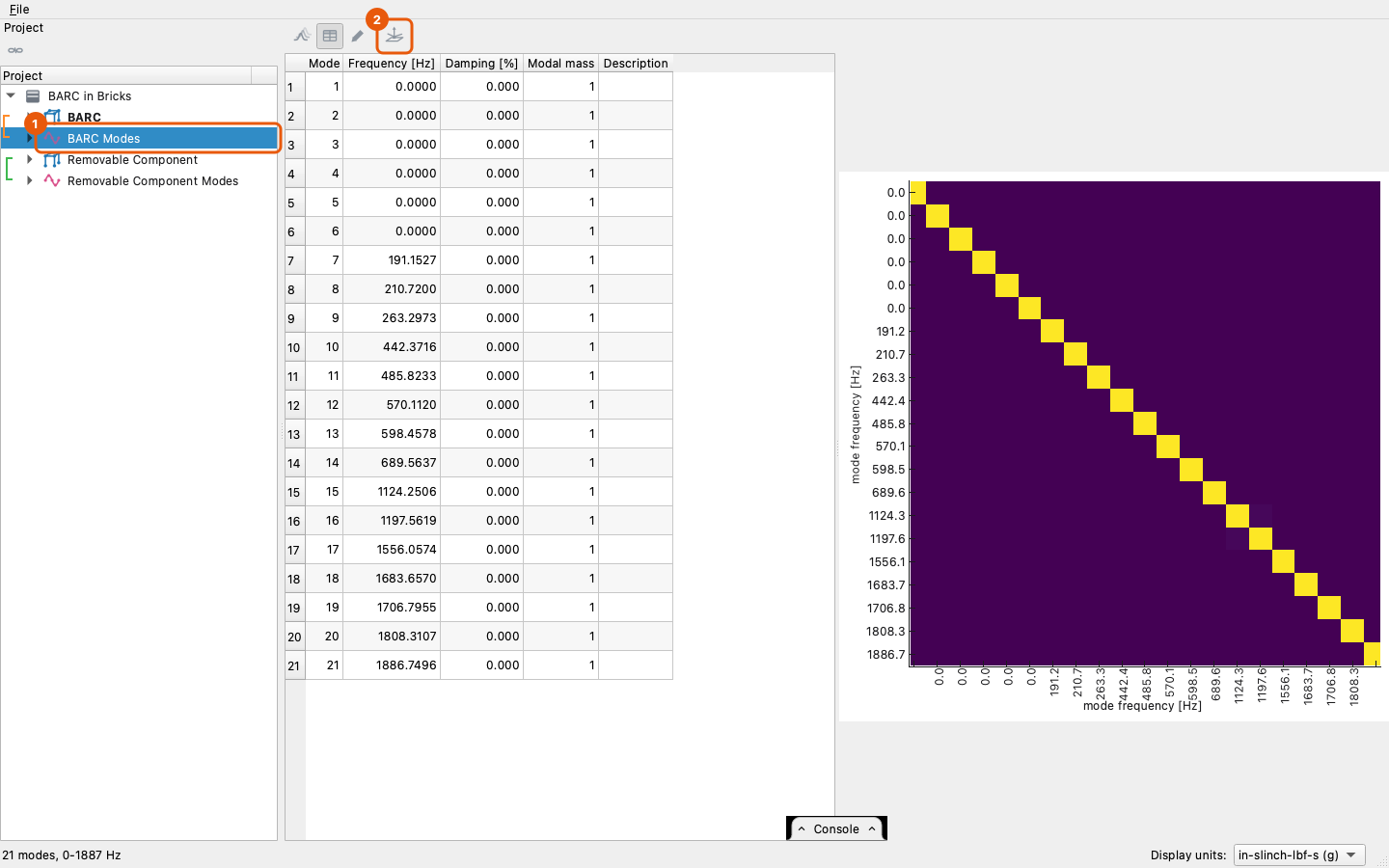
Select a shape set of finite element modes, or pick some of its modes in its grid, and press Plan Instrumentation on the bar.
The pane opens beside the 3-D view, with the model's surfaces drawn and the planned sensors on them: each tri-axial accelerometer as a triad of its place's axes, each uni-axial one as an arrow, X red, Y green and Z blue.
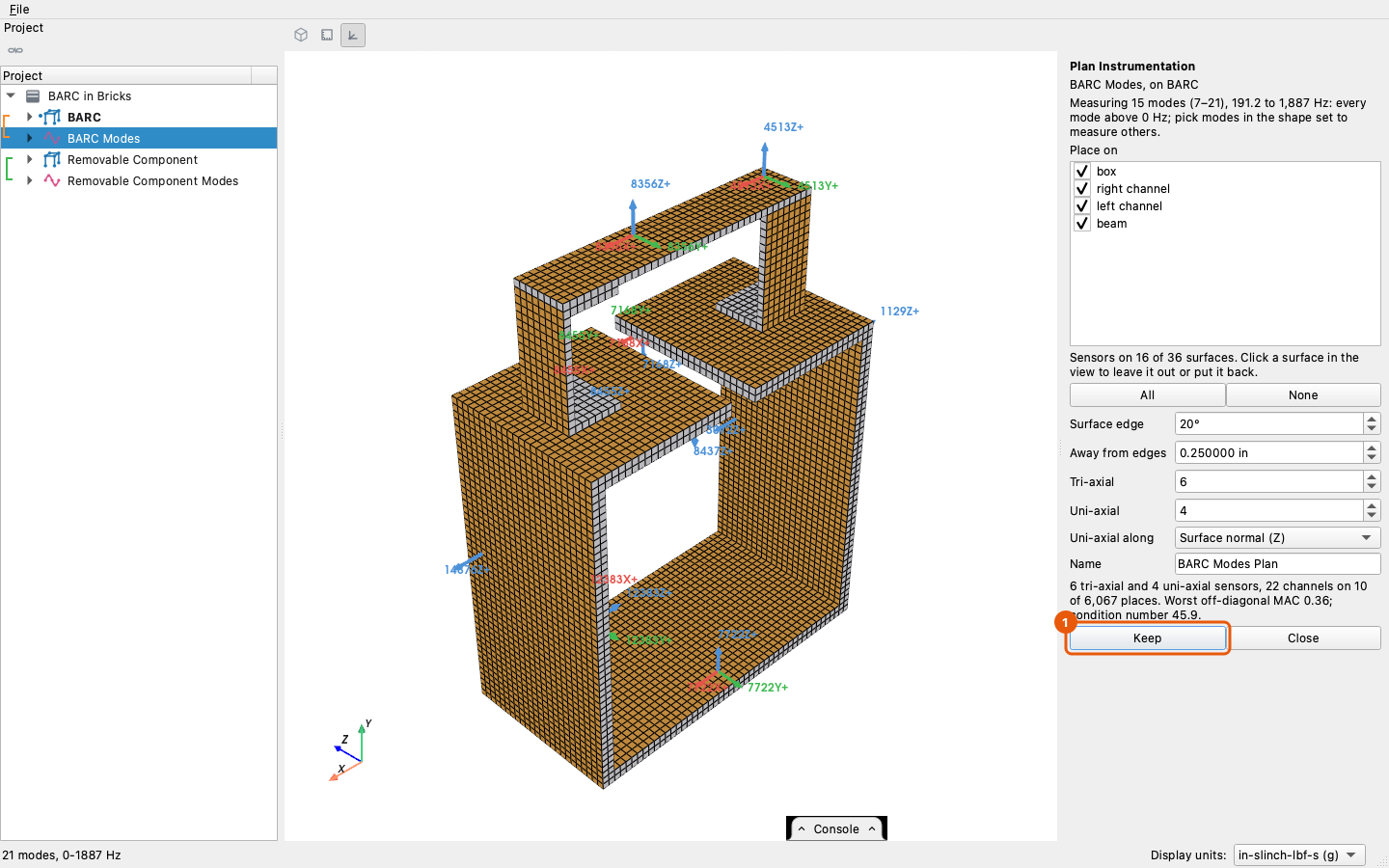
- The modes measured are the ones selected: the modes picked in the shape set's grid, or every mode above 0 Hz when the shape set itself is selected. Pick other modes while the pane is open and it plans for them.
- Place on lists the element groups; uncheck one to keep sensors off it.
- The surfaces sensors may go on are drawn in the solid color and the ones left out in gray; the small ones start out gray. Click a surface to leave it out or put it back; the surface under the cursor lights up. Dragging turns the view as usual and changes nothing. All puts every surface back, None leaves every one out, to click back the few wanted.
- Surface edge is the angle that splits the outside into surfaces. Raise it for a coarse curved mesh that comes out as a strip of surfaces.
- Away from edges is the distance a place keeps from its surface's edge, in the display unit system.
- Tri-axial and Uni-axial are the counts. Uni-axial along is the surface normal, or any direction of the place's system.
- The reading under the settings gives the counts, the channels, how many places were chosen out of how many, the worst off-diagonal term of the auto-MAC at the chosen channels, and the condition number of the information matrix. A lower worst MAC and a lower condition number both mean the sensors tell the modes apart better.
Keep adds the plan to the project as three linked objects named from the Name box: '... Geometry', '... Channels' and '... Shapes'. The shapes hold every mode that was selected, even those the plan could not resolve, so their auto-MAC shows what the instrumentation will and will not separate.
From a script
added = project.plan_instrumentation('Geometry Modes', 12, 6)
added['geometry'], added['channels'], added['shapes']
# ('Geometry Modes Plan Geometry', 'Geometry Modes Plan Channels',
#  'Geometry Modes Plan Shapes')
project[added['shapes']].auto_mac()
The options are the pane's: modes= (indices; every mode above 0 Hz by
default), groups= (ids or names), surfaces= (the surface numbers
kept; by default those of at least 1 % of the area), edge_angle= (degrees), edge_distance= with unit=, axes=
(0, 1, 2 for a place's X, Y, Z; (2,), the normal, by default) and
name=. With fewer directions than modes the call plans for the lowest
and warns with core.instrumentation.FewerDirectionsWarning.
The steps are also open one at a time in visualdynamics.core.instrumentation:
skin splits the outside into numbered surfaces, candidates builds
the experimental geometry of the places, local_shapes reads the modes
in each place's directions, effective_independence chooses, and
assemble makes the three objects.
What it does not do yet
Sensors cannot be required at or kept from particular places other than by surface, and the order in which sensors would be added is not given. A large hole's bore counts as a surface like any other; leave it out with a click.